

Maintaining high software quality is essential, as even small defects can reduce user confidence. That is why testing is a core component of modern development. As applications become faster and more complex, software testing companies must select the appropriate testing methods at the right time. Two commonly discussed approaches are unit testing and regression testing. Although they sound similar, their purposes are fundamentally different.
Unit testing focuses on the smallest units of code, verifying whether a single function or module works as expected. In contrast, regression testing has a broader scope, ensuring that existing functionalities remain unaffected by code updates. In other words, it protects what already works.
Many teams confuse these testing types or assume one can replace the other. This misunderstanding can lead to missed bugs and unstable releases. Knowing when and how to use each test improves speed, quality, and confidence. In this blog, we will clearly explain regression testing vs unit testing. We will explore their roles, benefits, and key differences. This will help you make smarter testing decisions and build reliable software.
What is Regression Testing?
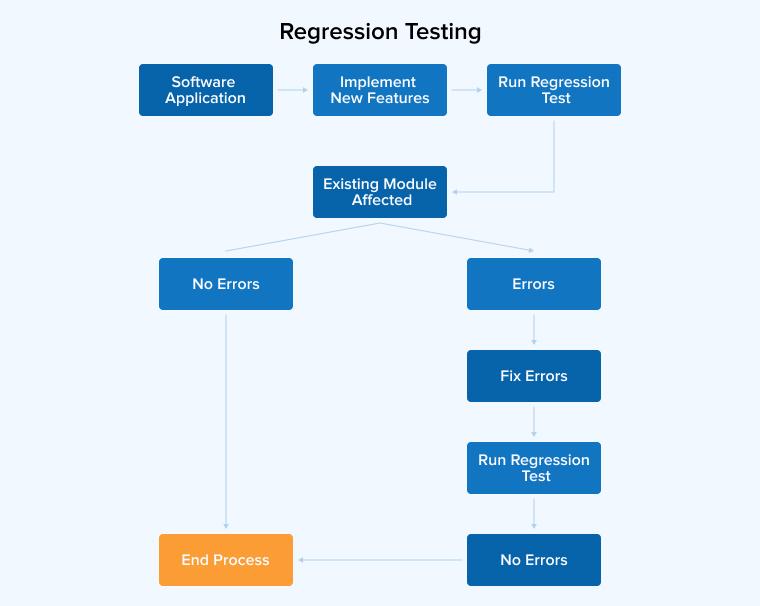
Regression testing protects software from unexpected failures after code changes. Each update can affect parts of the system that are already functioning well. This testing ensures that existing features continue to perform correctly. It helps teams to identify hidden issues before users encounter them.
Regression tests are usually run after fixes, updates, or new features are added. They work in conjunction with unit tests to enhance stability. While unit tests focus on small sections of code, regression testing checks the overall behavior of the application. Skipping this step can cause serious problems in production. A consistent regression testing process reduces risk and saves time by ensuring the application remains reliable as it continues to grow.
Regression Testing Techniques
The following three are the most significant regression testing techniques:
Complete Retest
The complete retest method is used when major changes affect the core structure of an application. This method involves running all existing test cases again, verifying every feature, including recent updates. The process provides strong confidence in system stability. However, it requires more time, effort, and resources. Due to its high cost, it is best suited for large updates or critical software changes.
Selective Regression Testing
Selective regression testing is used when software changes are small and limited. It tests only the affected modules, instead of the entire system. This approach saves time and effort during testing by verifying how new or modified features interact with existing code. By focusing on relevant test cases, it ensures stability while using fewer resources.
Prioritization of Test Cases
Test case prioritization is a method used to improve the efficiency of regression testing. In this approach, test cases are arranged based on their importance and risk. Tests that affect core features are executed first, as these areas typically have a higher impact on users. Next, moderately important tests are run, followed by low-priority tests at the end. This process helps detect major issues early and saves time when testing resources are limited.
Advantages of Regression Testing
Some of the pros of regression testing are:
- Ensuring Software Stability and Reliability: Regression testing ensures that software remains stable after changes by verifying that existing features continue to work correctly. Manual testing is slow and error-prone, while automated tests run faster and provide more accurate results.
- Efficiency through Automation: Automated regression testing accelerates repeated test runs and enhances efficiency. It reduces manual effort, saves time, and ensures consistent results, especially for large applications with frequent updates or complex functionality.
- Cost Efficiency: Catching defects early prevents costly problems in production. Fixing issues during development saves time and money, and avoids potential revenue loss, making early testing an essential practice.
- Stops Old Bugs from Coming Back: Regression testing confirms that previously fixed bugs remain resolved. It prevents old issues from reappearing, ensuring that updates do not reintroduce past problems.
Example of Regression Testing
The following are the three examples demonstrating Regression Testing:
Example 1: Login Enhancement
New Feature: “Remember Me” option
Regression Tests:
- Valid login
- Invalid login
- Logout
- Session timeout
- Forgot password
Example 2: Checkout Flow Update
New Feature: New payment method
Regression Tests:
- Product search
- Add to cart
- Existing payment methods
- Order confirmation
Example 3: Banking UI Enhancement
Change: Dashboard redesign
Regression Tests:
- Login
- Fund transfer
- Account statement
- Logout
What is Unit Testing?

Unit testing verifies that small parts of code function correctly. Each test targets a single function or module. This testing occurs early in the development process and helps developers identify issues before the codebase becomes larger.
Unit tests focus on internal logic, making them a key component of white-box testing. Because their scope is small, these tests run quickly and are easy to manage. Most unit tests are automated, which saves time and effort. Fixing bugs at this stage is less costly than addressing them later. Unit testing supports agile practices and enhances code reliability, building a strong foundation for stable software.
Unit Testing Techniques
The following three techniques are the most significant for unit testing:
Statement Coverage
Statement coverage is a white box testing method used to verify code execution. Its goal is to execute every executable line of code at least once. This helps testers identify parts of the code that were not tested and shows how much of the program was actually executed. The result is usually expressed as a percentage of executed lines.
White Box Testing
White box testing is a technique that examines the internal code of a software system. During testing, testers have full visibility of the program’s structure and logic. It verifies how data flows within the system. All conditions, loops, and execution paths are carefully reviewed. This method helps detect hidden errors and security vulnerabilities. It is especially suited for testing complex logic and edge cases. Skilled testers design tests based on their deep knowledge of the system.
Black Box Testing
Black box testing is a method that evaluates software behavior without examining its internal code. Testers focus only on inputs and expected outputs. The goal is to verify that the system functions according to the defined requirements. This approach reflects how real users interact with the application. Test cases are created based on business rules and user needs. Programming knowledge is not required for this type of testing. It is usually performed after development is complete. Any issues found are documented and communicated to the developers.
Advantages of Unit Testing
Some of the pros of unit testing are:
- Early Bug Detection: Unit testing enables developers to identify and fix bugs early by testing small, individual parts of the code. This approach prevents issues from spreading, saves time, reduces costs, and ensures that new changes do not break existing functionality.
- Improved Code Quality: Unit testing enhances code quality by encouraging the creation of clear, small, and focused functions. It helps developers catch errors early, supports confident refactoring, and ensures that changes do not introduce new bugs by maintaining code reliability.
- Makes Debugging Easier: Unit testing boosts developer confidence by quickly identifying where the code breaks. It simplifies debugging, saves time, and enables safe refactoring. Automated tests catch errors early, helping maintain high-quality, reliable software throughout development.
- Easier Refactoring: Unit tests serve as a safety net during code changes. Developers can confidently refactor or optimize code, knowing that any mistakes or unintended effects will be detected and addressed promptly.
Example of Unit Testing
The following example will make your Unit test understanding clearer:
Bank Account with a mocked notifier (Python / unittest)
This example demonstrates:
- testing a small class in isolation,
- covering normal and edge cases,
- using a mock for an external dependency so tests stay fast and deterministic,
- writing focused tests (each test asserts one behavior).
Production Code: bank_account.py
from typing import Protocol
# External notifier interface (we will inject a mock in tests) class Notifier(Protocol): def send_alert(self, message: str) -> None: ... class BankAccount: def __init__(self, initial_balance: float = 0.0, notifier: Notifier | None = None): """ A simple bank account that accepts an optional notifier dependency. Injecting the notifier makes the class testable without external side effects. """ self._balance = float(initial_balance) self._notifier = notifier def deposit(self, amount: float) -> float: if amount <= 0: raise ValueError("Deposit amount must be positive") self._balance += amount return self._balance def withdraw(self, amount: float) -> float: if amount <= 0: raise ValueError("Withdrawal amount must be positive") if amount > self._balance: raise ValueError("Insufficient funds") self._balance -= amount # If balance drops below a low-balance threshold, notify (if notifier provided) if self._balance < 20.0 and self._notifier: self._notifier.send_alert(f"Low balance: {self._balance:.2f}") return self._balance def get_balance(self) -> float: return self._balance |
Unit tests — test_bank_account.py
import unittest from unittest.mock import Mock from bank_account import BankAccount class TestBankAccount(unittest.TestCase): def setUp(self): # Create a mock notifier and a fresh account before each test for isolation self.mock_notifier = Mock() self.account = BankAccount(initial_balance=100.0, notifier=self.mock_notifier) def test_initial_balance(self): # Verify constructor sets the balance correctly self.assertEqual(self.account.get_balance(), 100.0) def test_deposit_positive_amount(self): # Depositing a positive amount increases the balance new_balance = self.account.deposit(50.0) self.assertEqual(new_balance, 150.0) def test_deposit_negative_amount_raises(self): # Depositing non-positive amounts must raise an error with self.assertRaises(ValueError): self.account.deposit(-10.0) def test_withdraw_reduces_balance_and_no_notification_when_above_threshold(self): # Withdrawing a valid amount reduces the balance and does not notify new_balance = self.account.withdraw(30.0) # balance becomes 70.0 self.assertEqual(new_balance, 70.0) self.mock_notifier.send_alert.assert_not_called() def test_withdraw_insufficient_funds_raises(self): # Withdrawing more than the balance must raise an error with self.assertRaises(ValueError): self.account.withdraw(200.0) def test_withdraw_triggers_low_balance_notification(self): # Withdraw enough to drop below threshold and ensure notifier is called new_balance = self.account.withdraw(85.0) # balance becomes 15.0 self.assertEqual(new_balance, 15.0) self.mock_notifier.send_alert.assert_called_once() args, _ = self.mock_notifier.send_alert.call_args self.assertIn("Low balance", args[0]) if __name__ == "__main__": unittest.main() |
Code explanation:
- Purpose: Small, testable BankAccount demonstrating DI (inject Notifier), clear business rules, and no external I/O.
- Key Behavior: positive-only deposits, positive-only withdrawals, no overdraft, optional low-balance notification when balance < 20.0.
- Design Choices (1-line each):
- Dependency injection → easy to mock notifier in tests.
- Explicit exceptions → easy to assert error cases.
- No I/O in class → deterministic, fast tests.
- What to Test (Short Checklist):
- Initialization sets the balance.
- Deposit increases the balance and rejects non-positive values.
- Withdrawals decrease the balance, reject non-positive amounts, and incur overdrafts.
- The low-balance notifier was called exactly when the threshold was crossed.
- Run Tests: python -m unittest discover -v
Unit Testing vs Regression Testing: Core Differences
We’ll now differentiate between unit testing and regression testing across the following five parameters:
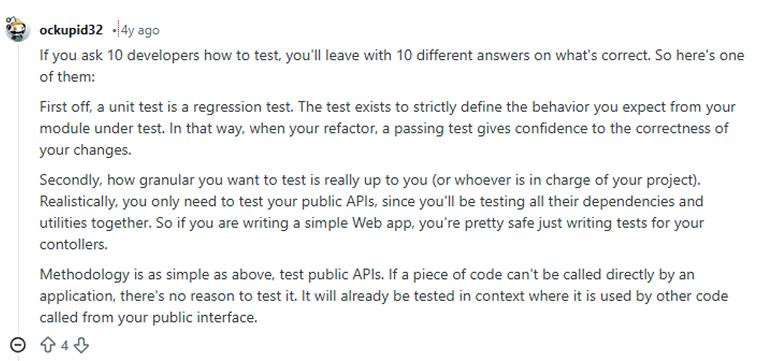
Take a look at what a Reddit user says about unit testing vs regression testing.
1. Scope/Code Coverage
- Unit Testing: Unit testing examines individual components such as functions, methods, or classes in isolation. Its scope is narrow, focusing on a single code element at a time. Unit tests aim to cover every branch, statement, and condition within that unit, ensuring that internal logic works correctly. This precise focus provides fast feedback but does not test interactions between different units.
- Regression Testing: Regression testing operates across the broader system, verifying that recent code changes have not disrupted existing functionality. Its scope spans multiple modules, components, and workflows. Regression tests prioritize covering real-world scenarios and interactions, ensuring that integrated units continue to work together correctly. This extensive coverage provides high confidence in system stability but generally requires more execution time.
2. Automation and CI/CD Integration
- Unit Testing: Unit testing is fully automated and focuses on small units of code. These tests run quickly and are automatically triggered in the CI/CD pipeline with every code commit, helping developers detect issues early and maintain code stability.
- Regression Testing: It verifies whether existing features continue to function correctly after changes. This process can be automated or manual and typically runs in the later CI/CD pipelines to validate complete workflows and user interactions before releasing updates.
3. Test Objectives
- Unit Testing: Unit testing focuses on verifying small and specific pieces of code. Developers test individual functions, methods, or classes to ensure they behave correctly on their own before being integrated with other parts of the application.
- Regression Testing: Regression testing aims to ensure overall system stability after changes. Testers verify that new features or fixes do not break existing functionality and that all previously working components continue to perform as expected.
4. Development Phase
- Unit Testing: This testing occurs during the active development phase. Developers run these tests immediately after writing or modifying code to verify that the new logic works correctly and does not introduce errors at the component level.
- Regression Testing: Regression testing is typically performed later in the development cycle, usually before releasing a feature. Testers verify that recent changes integrate smoothly and that existing features continue to function correctly throughout the entire application.
5. Agile vs. Waterfall Approach
- Unit Testing: In Agile projects, unit testing occurs continuously as developers write code and is automated within CI/CD pipelines. In Waterfall models, unit tests are executed only after the development phase ends, which delays feedback and limits early error detection.
- Regression Testing: Regression testing in Agile is performed at the end of each sprint to ensure overall stability after changes. In Waterfall, it typically occurs much later, after full integration, which increases the risk of discovering critical issues close to the release.
Tools in Unit and Regression Testing
Let’s go through three popular tools for regression and unit testing, respectively:
Regression Testing Tools
Selenium
Selenium is a popular open-source tool for automating web application testing. It supports multiple programming languages and browsers, making it ideal for cross-browser regression testing. Selenium integrates easily with CI/CD pipelines and helps teams maintain reusable, scalable test suites.
Sahi Pro
Sahi Pro is a tester-friendly automation tool designed for regression testing of large web applications. It supports cross-browser testing, REST APIs, and dynamic content handling. With built-in reporting, Excel integration, and parallel execution capabilities, it enables fast testing with minimal maintenance.
Cerberus Testing
Cerberus Testing is a low-code, open-source automation platform that supports web, mobile, API, desktop, and database testing. Its simple web interface enables both technical and non-technical teams to create reusable tests, run them in parallel, and integrate easily with CI/CD pipelines.
Top Unit Testing Tools
NUnit
NUnit is a popular unit testing framework for .NET applications. It supports multiple .NET languages and platforms. Developers use it to write reusable, data-driven tests. It integrates with CI/CD pipelines and allows parallel execution for faster feedback.
Quilt HTTP
Quilt is a free, cross-platform tool for Java unit testing. It measures code coverage using statement analysis without changing source files. It works at the JVM level, it supports JUnit, visualizes control flow, and creates clear test coverage reports.
Emma
Emma is a free, open-source tool for measuring Java code coverage. It helps developers understand how thoroughly their tests exercise the code. It supports multiple coverage levels and generates clear reports in text, HTML, or XML formats.
Use Cases: When to Use Regression Testing vs. Unit Testing
We’ll now understand the unit testing scenarios and regression testing scenarios, respectively:
Use Cases of Unit Testing
Test-Driven Development
In test-driven development, developers write unit tests before implementing features. These tests run quickly and guide incremental code changes. This cycle helps verify each method early and builds reliable functionality step by step.
Refactoring
Strong unit tests give developers confidence while refactoring code. They quickly reveal whether changes affect results. This allows safe optimization and a cleaner structure without compromising existing features or expected behavior.
Verifying Business Logic
Unit tests quickly verify complex logic and calculations, ensuring that functions such as pricing, taxes, or discounts work correctly. They instantly check any changes, maintaining accurate and reliable results.
Use Cases of Regression Testing
Checking UI Behavior
Regression testing checks the user interface to ensure that layouts, interactions, and features work correctly across devices and browsers, providing users with a consistent experience.
Check Feature Integration
Regression testing ensures that system integrations work properly by verifying data flow, API interactions, and error handling, thereby preventing new features don’t break existing processes.
Changes in Requirements
Regression testing is needed when requirements change, such as when a feature is removed, to ensure that existing functionality continues to work correctly and no new issues are introduced.
Comparison Table: Regression Testing vs Unit Testing
Let’s take a quick look at the key differences between regression testing and unit testing:
| Parameters | Regression Testing | Unit Testing |
|---|---|---|
| What is it? | The goal is to validate the stability of established features after code updates, ensuring recent modifications haven’t introduced new defects. | Works on verifying individual components to test every function correctly. |
| Who performs? | Quality Assurance (QA) professionals | Software developers |
| Execution time | After code modifications for bug fixes, feature enhancements, updating configurations, etc. | Unit testing and software development go side by side |
| Execution frequency | At particular intervals | Very frequent |
| Scope | Spans multiple components or even the entire system | Focuses on individual code units |
| Manual or automated? | Can be both manual and automated | Mainly automated |
| Required maintenance | Moderate | High |
| Failure Cost | Very High | Low |
| Debugging | Quite complex and time-consuming | Simple and quick, as it tests isolated components |
| Test Environment | Requires a production-like environment | Simple and controlled |
| Tools | Selenium, Cypress, Ranorex, TestComplete, etc. | NUnit, JUnit, Mocha, Jest, PyTest |
| Feedback Loop | Very slow | Instantaneous and occurs immediately |
Final Thoughts
Regression testing and unit testing are two different but complementary approaches to ensuring software quality. They operate at different scopes and serve different primary purposes within the software development lifecycle. Unit tests provide foundational checks that verify the internal integrity of individual components, while regression tests are the complete validation to ensure the entire system remains cohesive and functional as it evolves. Using both concurrently creates a comprehensive testing strategy that detects defects at various stages and scopes, improving the overall quality and reliability of the software.
FAQs
No, unit testing and regression testing are not the same. Unit testing focuses on testing individual code units, while regression testing ensures that new changes haven’t broken existing functionality of the software.
The four important types of regression testing are Unit Regression Testing, Partial Regression Testing, Full Regression Testing, and Selective Regression Testing.
The three popular unit testing types are Black Box Testing, White Box Testing, and Gray Box Testing.
Unit testing verifies small pieces of code during development. Regression testing rechecks existing features after changes to ensure that new updates do not break previously working functionality.

Badal Patel is a Project Manager at TatvaSoft, overseeing a large team of software developers and ensuring the highest quality standards throughout the development process. He has over ten years of experience delivering reliable solutions across various industries.



Comments
Leave a message...