

Running a small business in 2026 is no longer just about making a good product or providing a service. It is all about staying efficient, secure, and connected in this fast-moving digital world. Technology has become essential for managing daily operations, protecting data, and delivering better customer experiences. However, this has raised difficulties for small businesses, such as limited budgets, smaller teams, and a lack of in-house expertise. These limitations can slow growth and make it difficult to compete with larger organizations.
This is where IT outsourcing services come into play. By outsourcing IT needs, small businesses can access skilled IT professionals and advanced tools without hiring a full internal team. It increases the business growth adaptability, enabling organisations to adapt quickly to changing demands, resulting in high efficiency and operability. According to Statista, the IT Outsourcing market is projected to grow at a compound annual growth rate (CAGR) of 6.20% from 2026 to 2030, resulting in a market volume of US$806.55bn by 2030.
This blog is a detailed guide for small businesses looking to outsource their technical requirements. It explains the IT outsourcing benefits, services that can be outsourced, and how to choose the right outsourcing partner for your business.
What is IT Outsourcing?
IT outsourcing is the practice of hiring an external company to manage business technology needs instead of handling everything with an internal team. The external company takes care of tasks like software development, application maintenance, cloud management, cybersecurity, QA testing, IT infrastructure, proactive support, help desk support, and data backup.
Companies can outsource their entire IT function or just specific parts that their internal team cannot handle. Most small businesses work with a Managed Service Provider (MSP) or a technology partner who monitors, maintains, and improves their systems on an ongoing basis.
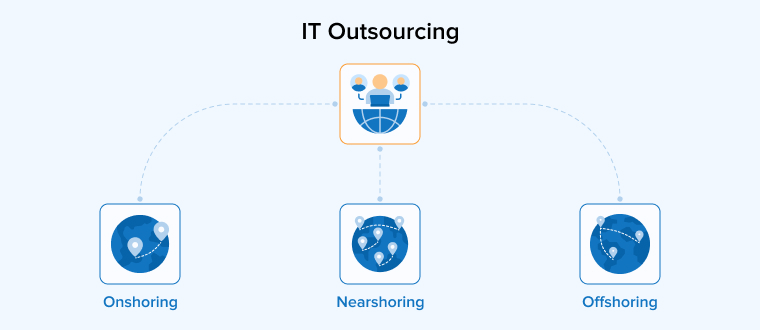
There are three common outsourcing models, i.e., Offshore outsourcing, Nearshore outsourcing, and Onshore outsourcing. In Offshore outsourcing, the third-party provider is in a different country, offering better cost savings and access to a larger talent pool. In Nearshore outsourcing, the provider is in a nearby country or similar time zone, making communication easier. And in Onshore outsourcing, the provider is in the client’s own country, which simplifies compliance but costs more. One thing worth understanding is the difference between staff augmentation and outsourcing. Staff augmentation adds individual specialists to your existing team temporarily, whereas outsourcing transfers responsibility for specific IT functions to the provider entirely. Many businesses use a mix of both depending on the project.
Does Your Business Need IT Outsourcing Services?
Small businesses run into IT problems that slow everything down. The website crashes during a product launch, a custom application stops working after an update, security threats keep growing, and no one in the team has time to handle any of this properly. When a business depends on software apps and digital tools for daily operations but lacks the staff or expertise to manage them, things break fast.
For a business with 10 to 50 employees, hiring in-house developers, QA engineers, cloud specialists, and security analysts becomes quite expensive. They’ll have to manage the costs of their salaries, benefits, tools, and training for multiple roles, which is not feasible. This kind of investment rarely makes sense when they can access the same expertise through an outsourcing partner.
If in a company development projects keep getting delayed, the internal team keeps fixing the same bugs, or there is no formal plan for security and infrastructure, it’s a clear sign that the current IT setup is no longer enough. Managed IT services give a structured way to handle all of this without building an internal department from scratch.
What Are the Top Benefits of Outsourcing IT for Small Businesses?
IT Outsourcing gives small businesses real, competitive advantages, whether it needs software built, apps maintained, cloud infrastructure managed, or AI integrated into their workflows.
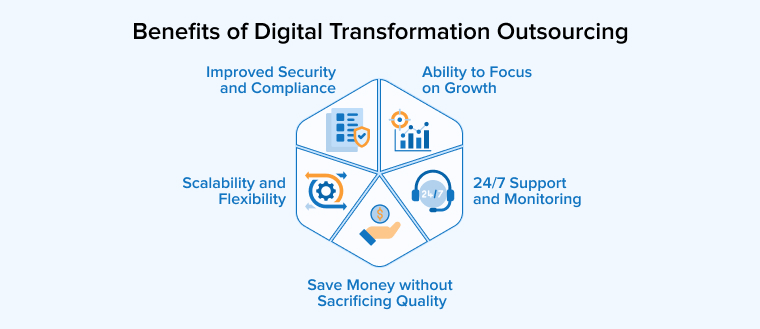
Save Money Without Sacrificing Quality
Building an internal team for every IT need is expensive. The total cost of hiring developers, QA engineers, cloud architects, security analysts, and project managers is quite high. Outsourcing gives businesses access to all of these specialists through a single provider at a predictable cost. They get quality work delivered on time without the overhead of salaries, office space, equipment, and ongoing training.
24/7 Support and Monitoring
Technology runs any business around the clock, and problems do not wait for office hours. Whether it is about a production server going down, a bug in the live application, or a security alert in the cloud environment, outsourced providers monitor all systems continuously. Their teams are available day and night to resolve issues before they affect their customers or operations.
Improved Security and Compliance
Small businesses frequently face cyberattacks because they often lack dedicated security resources. An outsourced IT partner handles vulnerability assessments, endpoint protection, data encryption, secure coding practices, and compliance support for standards like ISO 27001, SOC 2, and HIPAA. They also keep the software and infrastructure patched and updated, which is one of the simplest ways to prevent breaches.
Scalability and Flexibility
The IT needs of any business can change constantly. A company may require five developers for a product launch and two for maintenance afterwards. It might also need to add AI capabilities, build a mobile app, or migrate to the cloud on short notice. Outsourced IT scales with such scaling requirements. Thus, businesses may ramp up resources when demand increases and scale back when the project wraps, without long-term hiring commitments.
Ability to Focus on Growth
Every hour your internal team spends on managing servers, debugging code, or handling IT tickets is an hour taken away from strategy, sales, and customer relationships. When businesses hand off software development, infrastructure management, QA testing, and technical support to a capable partner, their internal team gets to focus entirely on growing the business.
What IT Solutions Can Businesses Outsource?
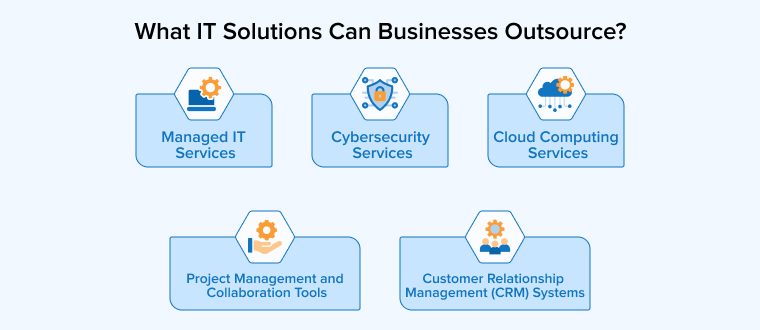
Small businesses can outsource a wide range of IT services depending on their business needs. Here are the most common and impactful categories.
Managed IT Services
Managed IT services cover day-to-day technology operations. A provider takes full responsibility for keeping the systems running under a Service Level Agreement (SLA) that defines response times, uptime targets, and support availability. Most core businesses start here because it covers the broadest set of needs under one contract.
- Infrastructure and network management
- Hardware and software maintenance
- Help desk and end-user support
- IT strategy and technology consulting
- Backup and disaster recovery planning
Cybersecurity Services
Cybersecurity is one of the most commonly outsourced functions because it requires specialized skills and constant attention. An outsourced security partner protects a business by running continuous threat monitoring, scanning for vulnerabilities, and managing endpoint protection across every device. They also handle compliance requirements for standards like ISO 27001, SOC 2, HIPAA, and GDPR, and train in-house employees to recognize phishing and social engineering attempts before they cause damage.
- Threat detection and incident response
- Vulnerability scanning and penetration testing
- Endpoint protection across all devices
- Compliance management and audit support
- Employee security awareness training
Cloud Computing Services
Cloud services let businesses move away from physical servers and give their team secure access to tools and data from anywhere. An outsourced provider handles the full process from migrating existing systems to the cloud, setting up the right architecture, and managing it on an ongoing basis. They also take care of data backup, disaster recovery, and multi-cloud setups so the business stays operational even when something unexpected happens.
- Cloud modernization and migration
- Infrastructure-as-a-Service (IaaS) management
- Data backup and disaster recovery in the cloud
- Multi-cloud and hybrid cloud architecture
- Platform-as-a-Service (PaaS) deployment
Customer Relationship Management (CRM) Systems
CRM platforms like Salesforce, HubSpot, and Microsoft Dynamics need proper setup, customization, and ongoing administration to deliver real value. The outsourcing team keeps managing customer data organized, sales pipelines visible, and marketing workflows automated.
- CRM implementation and configuration
- Data migration from legacy systems
- Workflow automation and reporting setup
- Third-party integrations
- Ongoing administration and user support
Project Management and Collaboration Tools
Project management tools like Jira, Microsoft Teams, Slack, and Asana work well only when they are configured properly and integrated with existing systems. Outsourced IT providers handle tool selection based on the business’s internal team size and workflows. Then, they set up proper access controls and connect these platforms with the company’s CRM, development tools, and communication channels. This becomes especially important when you hire dedicated developers or scale your remote workforce, because poor tool setup directly slows down onboarding and team collaboration.
- Tool selection and configuration
- Integration with existing business systems
- User onboarding and access management
- Workflow optimization for distributed teams
- Ongoing maintenance and updates
How to Choose the Right IT Outsourcing Service Provider for Small Businesses?
Picking the wrong provider wastes time, money, and trust. Here is what to look for before you sign anything.
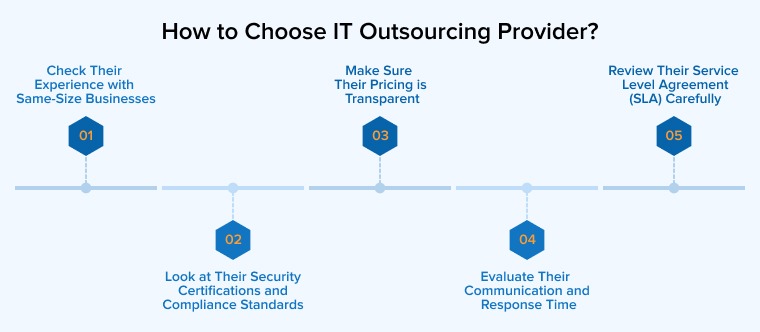
1. Check Their Experience with Same-Size Businesses
A provider that mostly works with large enterprises will not understand the constraints of a small business. A small business owner needs a partner who has worked with teams of 10 to 100 employees and knows how to deliver results within tight budgets and lean timelines. Therefore, it’s important to ask for case studies or references from the provider if they have completed similar projects for industries of their type and size. Business owners must ask the right questions to evaluate a provider’s credibility, which is only possible when they understand how to choose a software development vendor.
2. Look at Their Security Certifications and Compliance Standards
The outsourcing provider will have access to sensitive business data, customer information, and internal systems. Hence, it’s crucial to verify their security credentials before handing them over. The business owner must look for certifications like ISO 27001, SOC 2, and CMMI Level 3, and review their data handling, encryption methods, access controls, risk management, and regulatory compliance measures relevant to your industry. A provider without proper certifications is a risk that businesses can’t afford.
3. Make Sure Their Pricing Is Transparent
Hidden costs are a major concern for businesses looking for IT Outsourcing. Get clarity upfront on what is included in the monthly fee and what counts as an extra charge. Flat-rate monthly plans are the safest option for small businesses because they make budgeting predictable. Avoid providers who charge hourly for basic support or add surprise fees for things like onboarding, software updates, or after-hours requests.
4. Evaluate Their Communication and Response Time
Good technology means nothing if clients cannot reach their provider when something breaks. Ask about their average response time, support availability, and how they handle escalations. Find out if you get a dedicated account manager or just a generic ticket system. Providers in similar or overlapping time zones make communication smoother, especially when they need real-time collaboration on development or infrastructure projects.
5. Review Their Service Level Agreement (SLA) Carefully
A Service Level Agreement (SLA) is a detailed contract explaining all the aspects of services provided by the outsourcing provider to the business. It should clearly define uptime guarantees, response times, escalation procedures, data ownership, and what happens if the provider fails to meet their commitments. If a company decides to switch providers later, it needs to make sure that ownership of all code, documentation, and system configurations is retained without any clash.
Conclusion
Outsourced IT services for small businesses give access to the technology, talent, and data security that growing companies need without the cost of building everything internally. It allows IT service providers to operate with the same capabilities as larger organizations while keeping their costs predictable and the team focused on revenue.
The way businesses use IT outsourcing is also changing fast. AI-powered services, automation, and cloud-native development are becoming standard offerings from providers. Small businesses that start outsourcing now will be better positioned to adopt these emerging technologies early rather than rushing in the end to get on track.
FAQs
Small business IT outsourcing means hiring an external company to handle the technology needs by paying a fixed amount. This includes services like software development, cybersecurity, cloud management, help desk support, QA testing, and IT consulting.
Start with cybersecurity and managed IT services. These two areas carry the highest risk if left unmanaged and deliver the fastest return. Once your security and infrastructure are stable, move to cloud management, software development, and CRM administration based on where your team struggles the most.
Managed IT means the outsourcing provider handles everything, from infrastructure and security to support and strategy. Co-managed IT is a shared model where the internal team keeps ownership of certain functions while the provider covers the rest.
No, you can retain full control as long as you set clear expectations from the beginning. Define response times, uptime targets, and escalation steps in your SLA. Keep ownership of all data, code, and documentation, and arrange regular review meetings with your provider. The right outsourcing partner works as an extension of your team, not a replacement for your decision-making.

Itesh Sharma is core member of Sales Department at TatvaSoft. He has got more than 6 years of experience in handling the task related to Customer Management and Project Management. Apart from his profession he also has keen interest in sharing the insight on different methodologies of software development.



Comments
Leave a message...