


With the increasing complexity of software, even well-planned testing processes can not guarantee that every issue will be caught. There are some defects that appear only when the application is used in unexpected ways beyond predefined test cases. This is where ad hoc testing comes into play. It is an on-the-spot testing process that can be performed at any stage. It helps uncover those issues that even structured tests may overlook.
As applications grow more complex with multiple integrations and platforms, this approach adds an extra layer of confidence in product quality. Many organizations offering software testing services use ad hoc testing alongside formal methods to strengthen overall test coverage and ensure a more reliable and user-friendly application.
In this blog, we will explore the concept, benefits, limitations, testing process, and practical tips for applying ad hoc testing effectively in real projects.
What is Adhoc Testing?
Ad hoc testing is an informal method of evaluating software without using test cases, plans, or documentation. Testers explore the application freely and test features based on their experience and understanding of the product.
They perform both expected and unexpected actions to uncover hidden problems. This type of testing often occurs after formal testing or when time is limited. It helps identify rare or critical defects that structured testing may miss. Ad hoc testing depends heavily on the tester’s skill, intuition, and quick thinking rather than on written rules.
What Are the Advantages of Adhoc Testing?
Some of the major pros of ad hoc testing methods:
Flexibility
Ad hoc testing gives testers the freedom to adapt their testing approach based on experience and intuition. It does not rely on fixed plans, allowing testing to occurat any stage. This flexibility helps testers react quickly to new changes and find defects using logical judgment and error guessing.
Early Defect Detection
Ad hoc testing can begin very early in the development process, even before formal test planning starts. Testers freely explore features and user flows to identify usability problems and hidden defects. Detecting issues early reduces the effort required for fixes and helps prevent missed edge cases before release.
Agile Compatibility
Ad hoc testing fits naturally into agile teams that work in short cycles. Testers explore features freely and provide rapid feedback on changes. This approach supports collaboration, reduces reliance on documents, and helps teams uncover hidden issues while focusing on delivering working software quickly.
Allows for More In-depth Software Testing
Ad hoc testing supports other testing methods by filling their gaps. Testers explore the software using their understanding and instincts, performing checks on the fly. This approach improves overall coverage and helps testing teams uncover issues that scripted tests may not detect before progressing further.
Cost-Effective
Ad hoc testing saves time and money because it requires minimal planning and no additional tools. Testers work quickly to identify defects early, enabling teams to fix problems sooner, reduce costs, and release software faster with fewer resources.
What Are the Disadvantages of Adhoc Testing?
Keep the following limitations in mind before planning to perform ad hoc testing:
Difficulty in Evaluating Quality
Ad hoc testing makes quality measurement difficult because it lacks structure and documentation. Even when testers find no defects, development teams cannot accurately assess software quality. The absence of defined checks and recorded results creates uncertainty about the reliability of the tested features.
Insufficient Testing Metrics
Ad hoc testing makes progress difficult to measure because it lacks planning and documentation. Development teams struggle to track coverage, evaluate results, and understand what areas testers have already explored or missed.
Requires Experienced Software Testers
Ad hoc testing is most effective when performed by experienced testers who have a deep understanding of the software. New or unfamiliar testers may overlook defects, resulting in inconsistent outcomes and reduced effectiveness in identifying critical issues.
Challenging in Highly Regulated Environments
In regulated industries like healthcare and banking, testing must be structured and thoroughly documented. Ad hoc testing is unorganized, overlooks critical checks, and fails to provide the audit trails necessary for compliance.
5. No Documentation
Ad hoc testing often lacks proper documentation and predefined steps. This makes it difficult to reproduce defects, track what has been tested, and monitor test coverage. Consequently, debugging slows down, and issue resolution is delayed.
What Are the Types of Adhoc Testing?
There are multiple types of ad hoc testing. The three primary types include:
Buddy Testing
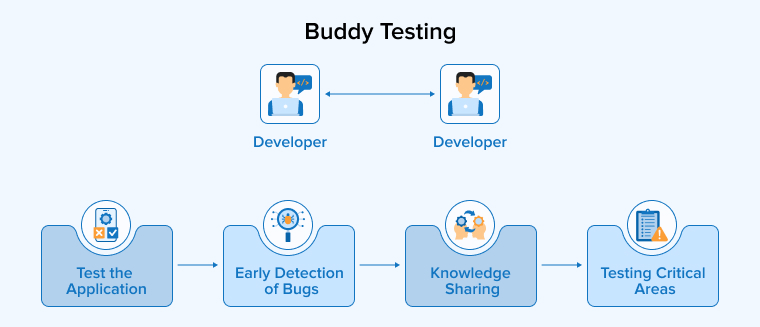
Buddy testing pairs a developer and a tester to work together on a single module. The tester provides random inputs, and the developer fixes issues immediately. This collaboration improves test case quality, uncovers hidden defects, and speeds up feedback. Both team members share their knowledge, with developers spotting design problems and testers focusing on usability. Typically performed after unit testing, buddy testing ensures thorough evaluation, faster issue resolution, and better overall software quality before release.
Pair Testing
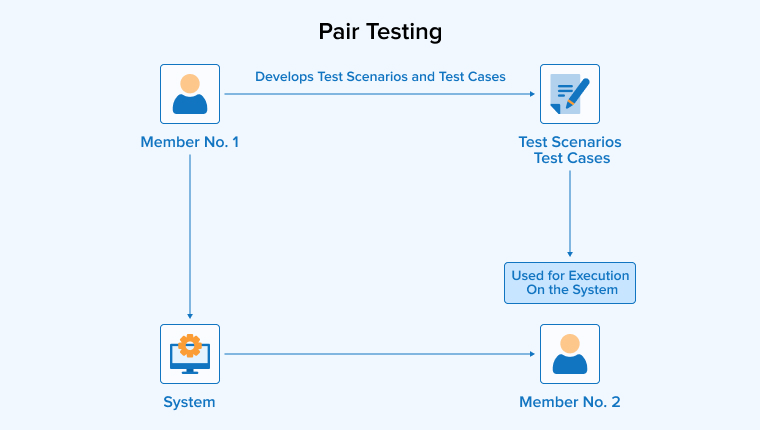
Pair testing involves two testers working together on the same module to uncover defects. One tester executes random or exploratory tests, while the other records findings and suggests improvements. They share ideas, knowledge, and observations throughout the process, which helps identify issues that a single tester might miss.
By combining complementary skills and perspectives, pair testing improves test coverage, enhances quality, and ensures that defects are clearly documented for developers. This method is repeated throughout development to provide continuous feedback.
Monkey Testing
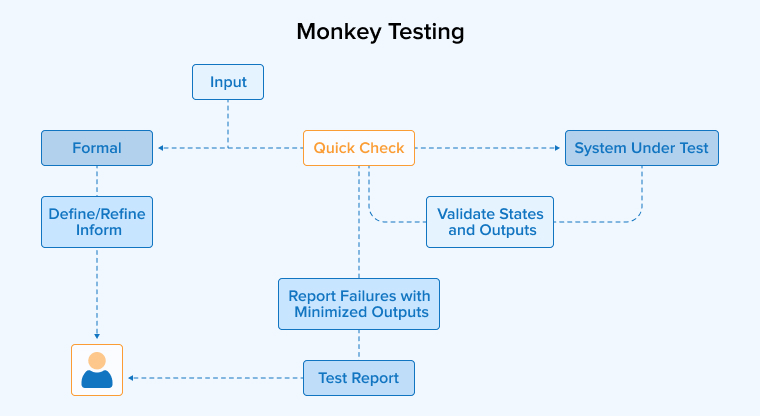
Monkey testing is an adhoc testing technique in which testers interact with the software using random inputs to observe how it responds. Testers may enter unexpected data, click buttons without any discernible pattern, or terminate processes abruptly. The goal is to push the application to its limits and uncover hidden defects that structured tests might miss. It does not follow predefined test cases, and testers observe the system for crashes, errors, or unusual behaviour.
By simulating unpredictable user actions, monkey testing helps reveal vulnerabilities, stress points, and potential failures, thereby improving the overall stability and reliability of the application.
How to Conduct Adhoc Testing?
Follow the step-by-step instructions below to execute the ad hoc testing process:
- Gain the System’s Understanding: Before testing software, understand its purpose, features, and user needs. Identify critical functions and high-risk areas. Learn how the software works to focus testing on potential defects and ensure that important components function correctly.
- Define Test Objectives: Set clear goals before starting ad hoc testing. Decide whether you are finding defects, checking usability, or exploring features. Focus on key areas and outline expected results to ensure effective testing.
- Set-up Test Environment: Set up the test environment to match real-world conditions. Provide all necessary tools, devices, browsers, and test data. This ensures accurate, reliable, and meaningful testing results.
- Explore the Application: Use the application as a real user. Explore its features, menus, and workflows freely. Try different actions, inputs, and paths to identify usability issues and uncover hidden defects.
- Diversify Input Data: Test the application using various types of input, including valid, invalid, and boundary values. Also, try unusual or extreme inputs to identify validation issues and unexpected behavior.
- Focus on Critical Areas: Focus testing on the most important features and critical user flows. Thoroughly explore these areas, and document any defects, including the steps and conditions necessary for developers to reproduce and fix them.
- Reproduce Defects: When you find a defect, repeat the same actions to reproduce it. Confirm that it occurs consistently, and record the steps clearly so developers can efficiently identify and fix the issue.
- Record and Document Test Findings: While testing, monitor for crashes, UI issues, slow performance, or incorrect outputs. Document all defects, unusual behavior, and areas for improvement. Include screenshots, logs, and clear steps to reproduce each issue.
- Collaboration and Communication: Share your test results promptly with the software development team and stakeholders. Discuss defects in detail, and collaborate to prioritize issues. Clear communication helps resolve problems quickly and efficiently.
- Iterate and Revisit: Ad hoc testing is iterative. After defects are fixed, recheck the application to confirm that issues are resolved and to ensure that the new changes do not create additional problems or regressions.
What Are the Tools to Perform Adhoc Testing?
Ad hoc testing is primarily a manual testing process, unlike structured testing methods. However, it can be automated to some extent using the following automated testing tools:
TestRail
TestRail helps teams organize and track testing activities, including exploratory and ad hoc sessions. Testers can create focused session entries with clear goals and time limits. During testing, they can add notes, screenshots, and logs directly to the session. The tool allows them to record outcomes and monitor progress in real time. When defects are found, they can be linked to tracking systems like Jira, ensuring no issue goes unnoticed. Teams can later review session records to analyze coverage and improve future testing efforts.
Selenium
Selenium is a popular open-source tool for automating web browser testing. Teams use it to handle repetitive tasks such as logging in, navigating pages, or filling out forms. Although it does not replace true ad hoc testing, it supports exploratory efforts by saving time on routine actions. Testers with programming knowledge can build automation scripts using WebDriver. Selenium works across major operating systems like Windows, macOS, and Linux. It also supports browsers such as Chrome, Firefox, and Safari, making cross-browser testing easier and more efficient.
JIRA
Jira supports ad hoc testing mainly by helping teams record and track defects. Testers can create bug tickets, attach screenshots, and describe reproduction steps for developers. They can also link issues to user stories or epics for better traceability. However, Jira does not provide comprehensive test management features. Therefore, teams often install apps like Xray or Zephyr to manage exploratory testing sessions more effectively. These tools allow testers to log results, capture notes, and generate reports, thereby improving visibility and overall test coverage.
Cucumber
Cucumber is an automated tool that supports Behaviour Driven Development. It allows teams to write test scenarios in simple, human-readable language. Business analysts and product owners describe how the system should behave before developers write the code. The team then reviews and approves these scenarios as acceptance criteria.
Developers then automate these tests using the Cucumber framework, often with Ruby or other supported languages. This approach improves collaboration, reduces misunderstandings, and ensures the application clearly and effectively meets business expectations.
Real-World Examples of Adhoc Testing
The following real-world use cases will provide developers and testing team members with clarity on how to apply ad hoc testing strategies:
- Stress Testing Features: A tester moves quickly through the app, opening and closing screens, and pressing random buttons to identify slow performance and hidden errors.
- Cross-Platform Compatibility: Testers usually focus on the busiest parts of an app. In ad hoc testing, they also try different devices and platforms without following fixed plans.
- Mobile App Gestures: A tester uses a touchscreen to perform quick swipes, taps, and drags in various patterns to identify design flaws and user experience issues.
- New Feature Validation: A tester explores a newly released feature without following a script. They perform various actions to assess stability and ensure the feature works smoothly for users.
- Error-Prone Modules: Testers frequently revisit parts of the app that are prone to failure. They carefully examine these sections to identify any hidden problems that may still persist.
- Post-Bug Fix Testing: Testers verify recently fixed errors and retest related features. They confirm that the solution works correctly and ensure no new faults have appeared elsewhere.
When Should You Use AdHoc Testing?
Ad hoc testing may enhance software quality in the following scenarios:
- User Acceptance Testing (UAT): Users test the software in real settings, noting issues and suggesting improvements to developers.
- During System Integration Testing: Testers freely explore the integrated system and identify unexpected errors that occur when different modules interact. Then, they share these findings with the team.
- Exploratory Testing: Testers perform spontaneous checks to quickly discover subtle bugs and report unusual behavior during sessions.
- Detect Hidden Errors: This approach helps testers identify bugs that structured tests often miss during planned testing activities.
- In Response to User Feedback: Testers run quick checks after user complaints, trace the issue and suggest fixes to resolve the problems.
When Not to Conduct Adhoc Testing?
It’s equally important to know when not to use ad hoc testing and to prefer structured testing methods instead. In the following scenarios, opt for conventional testing:
- Lack of In-depth Knowledge: Ad hoc testing fails when test cases are faulty or system knowledge is weak. Teams must correct errors and thoroughly understand the application before using this method.
- Large-scale Projects with Complex Requirements: In complex projects, ad hoc testing misses many scenarios. Therefore, teams use planned tests and automation to cover all features and performance requirements.
- Highly Regulated Environments: In regulated sectors, teams require documented and repeatable tests. Ad hoc testing cannot meet the strict compliance requirements set by authorities.
- When Testing New UI Elements: For new UI, teams should use planned negative tests. Ad hoc testing misses details and requires skilled testers to identify complex usability issues.
- When Thorough Test Documentation is Required: Projects requiring full traceability demand written test cases and reports. Ad hoc testing lacks documentation and cannot support audits or compliance requirements.
Best Practices to Conduct Adhoc Testing
Conduct ad hoc testing by following the best practices mentioned below:
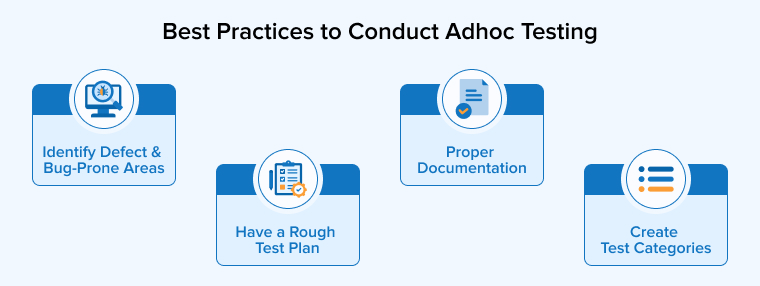
1. Identify Defect and Bug-Prone Areas
Before ad hoc testing, teams should review past defects and identify risky features. So, they can focus on complex or error-prone areas to quickly find serious bugs. This approach saves time and improves results. Tracking frequent problem areas also helps testers understand system weaknesses and plan future tests more effectively.
2. Have a Rough Test Plan
Ad hoc testing requires no prior plan, but a simple outline helps testers work more effectively. A rough plan guides focus on key and new features, reducing missed functions and saving time. Testers can also cover previously uncovered areas, improving overall coverage. This flexible planning makes each testing session more effective and organized.
3. Proper Documentation
Testers should record what they test, what they find, and how they fix issues. Notes help teams reproduce bugs and understand failures later. Simple records are sufficient. Keeping files for each project also supports future testing. These details improve strategies and strengthen existing test cases over time.
4. Create Test Categories
Testers should list all app features and organize them into clear categories. They should begin with features users access most frequently, such as login or checkout. This approach helps identify critical issues and prevent overlooking key functions. Grouping UI components and workflows also makes testing more organized and focused, leading to better defect detection and improved product quality.
Final Thoughts
Ad hoc testing is a flexible and useful method for finding bugs that structured tests may miss. It allows testers to explore software freely and use their experience to discover real issues. However, it should not replace formal testing methods. Teams should combine ad hoc testing with planned tests and maintain basic documentation to achieve reliable results. When used wisely, ad hoc testing improves defect detection and strengthens software quality. By balancing creativity and structure, QA teams can deliver better, more stable, and user-friendly applications.
FAQs
Exploratory testing combines learning, designing, and testing simultaneously with a clear goal. Ad hoc testing is unplanned and informal, conducted randomly without documentation or structure.
Ad hoc testing requires keen observation, strong product knowledge, creative thinking, and quick decision-making. Testers must quickly identify issues and think from the user’s perspective.
We perform ad hoc testing to uncover hidden defects that planned tests may overlook. This approach helps teams quickly check risky areas and improve overall product quality.
Testers often skip planning completely and overlook critical paths. They ignore note-taking, repeat random steps, rush execution, and fail to report clear, detailed defects.

Badal Patel is a Project Manager at TatvaSoft, overseeing a large team of software developers and ensuring the highest quality standards throughout the development process. He has over ten years of experience delivering reliable solutions across various industries.



Comments
Leave a message...