

Software products rarely remain unchanged for long. New features are added, bugs are fixed, and user expectations continue to grow. With every change, testing must also evolve to ensure the product still works as expected. This is where test scripts play a crucial role in software testing. A test script serves as a clear guide for testers, helping them verify each function step by step in a structured manner. For many teams, especially those working under tight deadlines, test scripts enable faster feedback and better decision-making.
A well-defined script ensures that it does not overlook any critical area, even when requirements change frequently. This becomes especially valuable when working with a professional software testing company that follows standardized processes and proven frameworks. In this blog, we will explore what test scripts are, why they matter, the challenges teams face in maintaining them, and practical ways to create effective scripts that support high-quality software delivery.
What are Test Scripts?
A test script is a practical guide that explains how to verify whether a software feature works correctly. It breaks testing into clear, actionable steps that a tester or tool can follow without confusion. Each script defines what to do, which data to use, and the expected result after each step. This approach helps teams conduct testing consistently and repeatably, even when the product changes frequently.
Test scripts are usually created from test cases, but go deeper by detailing the exact process to run the test. One test case can lead to multiple scripts tailored for different devices, browsers, or environments. Because scripts are more detailed, they help uncover hidden issues that might otherwise be missed. They also save time in future releases since reusable scripts reduce repeated effort. Within the SDLC, test scripts support early defect detection and consistent quality control. When written carefully, they improve accuracy, facilitate team collaboration, and make software testing more reliable and easier to scale.
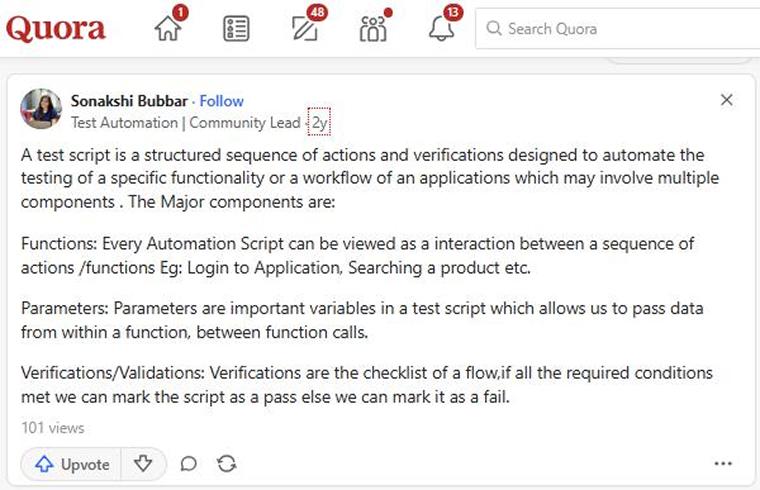
Here is what a Quora user says about Test Scripts.
Why Use Test Script?
Some of the most compelling reasons to use a test script are:
- Comprehensive Testing: Test scripts facilitate comprehensive testing by following clear steps, minimizing missed scenarios, and ensuring accurate results across large and complex software applications.
- Ensures Software Meets User Needs: Test scripts confirm that software functions align with user expectations by validating each requirement, especially for critical features that must work without failure.
- Tester Browses Product Freely: Test scripts guide their exploration by maintaining focus, preventing incorrect assumptions, and ensuring that expected behaviors are properly verified.
- Supports Exploratory Testing: Test scripts support exploratory testing by providing guidance while allowing testers the freedom to explore features and still verify expected results.
- Time and Cost Savings: Test scripts reduce repetitive manual effort and enable faster automated testing across devices, browsers, and platforms with minimal resource usage.
- Early Bug Detection: Automated test scripts help teams identify defects early by running tests frequently during development. Early detection reduces the costs and effort required for fixing issues. When features change suddenly, testers can quickly rerun scripts to confirm that nothing is broken. This approach saves time, enables faster feedback, and improves overall product stability.
Types of Test Scripts
Test scripts can be either manual or automated, with the choice depending on project requirements, system complexity, and available testing resources.

Manual Test Scripts
Human testers create manual test scripts to perform testing entirely without using automation tools. These scripts provide clear, step-by-step instructions on how to verify a feature or workflow. Testers use them to confirm behavior, observe visual details, and assess the overall user experience. Manual scripts typically include details such as preconditions, setup steps, actions to perform, and expected results. They are especially useful during early development stages when features change frequently and require human judgment.
Manual testing works well for exploratory, usability, and ad hoc testing because testers can adapt their approach during the process. This flexibility helps uncover issues that automated tests may overlook. However, manual test scripts take more time to execute and maintain, especially in large applications. Manual testers best use manual testing where accuracy, observation, and real user behavior matter more than speed or repetition.
Automated Test Scripts
Automated test scripts are created using programming languages and executed with automation tools to test software efficiently. These scripts simulate user actions and verify system responses without human intervention. Automation is especially useful for repetitive tests, extensive test cycles, and rapid release schedules. Different types of scripts serve different purposes, such as unit tests for early validation, integration tests for module interactions, and functional tests for business logic verification.
Regression testing scripts ensure that updates do not break existing features, while performance testing scripts measure behavior under load. Automated testing improves speed, accuracy, and coverage across platforms. Interface changes can cause test failures if scripts are not updated accordingly. Additionally, automation cannot replace manual testing, which requires creativity and judgment. When balanced well, automated scripts enhance software quality and support continuous delivery.
How to Write Test Scripts?
The following are methods to create test scripts:
Record/Playback Method
Record and playback scripting enables testers to create test scripts by capturing real user actions within an application. These tools automatically convert clicks and inputs into reusable scripts. This method helps teams build basic tests quickly with minimal coding effort, making it ideal for beginners and early testing stages. However, such scripts can break when interfaces change and often require frequent updates for long-term use.
Keyword/Data-Driven Scripting
Keyword and data-driven scripting focuses on separating test steps from test data. Testers use simple keywords like “click” or “verify” to describe actions, while the actual automation logic is handled in the background. Test data is stored separately and reused across multiple test runs. This approach reduces test script duplication and improves maintainability. It is especially effective for projects with frequent data changes and extensive test coverage. Non-technical users can easily design, while developers manage the underlying code.
Writing Code in a Programming Language
Code-based test scripts are written using programming languages such as Java, Python, or JavaScript and executed through automation frameworks. This approach provides testers with full control over test flow, validations, and logic. It supports complex scenarios, reusable components, and seamless CI/CD integration. These scripts scale well for large and complex applications; however, they require strong coding skills and careful maintenance.
Writing and updating these test scripts requires more effort compared to simpler methods. Therefore, code-based scripting is better suited for technical teams developing stable and long-term automation solutions.
Test Script Development Process
Below is a step-by-step guide for test script development to execute a well-planned testing strategy:
1. Requirement Gathering and Analysis
Before creating test scripts, testers must have a clear understanding of the software requirements and user goals. They collaborate closely with product owners, developers, and analysts to learn how the application should behave. This step helps identify testable scenarios, risks, and special conditions. A strong understanding ensures that the scripts validate the correct features and avoid gaps in testing.
2. Test Design and Planning
After understanding the requirements, testers move to test design and planning. In this stage, they decide what needs to be tested and how the testing will be conducted. They define the goals, scope, and testing methods. Testers identify key scenarios, core features, and possible edge cases. Proper planning prevents redundant tests and ensures that all important areas are covered. This step establishes a strong foundation for clear and effective test scripts.
3. Test Script Implementation
During the implementation phase, testers convert planned test cases into executable scripts. They write clear steps that simulate user actions such as clicks, data entry, and result verification. Scripts may be created for manual execution or automated tools, depending on project requirements. Testers prioritize clear naming conventions, logical flow, and accurate validations. This careful approach ensures that scripts are easy to execute, understand, and maintain over time.
4. Test Data Preparation
Preparing proper test data is a crucial step in creating effective test scripts. Testers select inputs that cover normal, boundary, and error conditions. They also include different user roles and system states. This data helps ensure the scripts reflect real usage and uncover hidden issues. Using structured and representative data makes tests reliable and meaningful across various scenarios and environments.
5. Test Script Execution
In the execution phase, test scripts are run on the software across different environments and configurations. Testers observe how the system responds and compare actual results with expected outcomes. This process helps identify errors, inconsistencies, or unexpected behavior. Running scripts under multiple conditions ensures the application functions correctly in various scenarios. Careful monitoring during execution confirms that the software behaves as intended and supports a reliable quality assessment.
6. Test Script Closure
A test closure report provides a summary of all testing activities. It records which tests were executed, their results, pass or fail status, and any defects identified. The report helps teams evaluate the effectiveness of testing and serves as a reference to improve future testing efforts.
Example of Test Scripts in Software Testing
Let’s see how the test scripts work in software testing:
Test Script Document
Project Name: SauceDemoEcommerceTests
Module Name: Login, Product Listing, Cart & Checkout
Test Environment
| Parameter | Details |
| Application URL | https://www.saucedemo.com |
| Browser | Google Chrome v142 |
| Operating System | Windows 10 (64-bit) |
| Build Version | Production |
| Test Data | standard_user / secret_sauce |
Test Script Approach & Tools
- Approach: Use Data-Driven Testing with the Page Object Model (POM) to separate test data, page actions, and test logic for better maintainability.
- Tools: Playwright with Node.js in VS Code is used for fast, reliable, cross-browser automation testing.
A Test Script Details
- Test Case ID: TC_SD_001
- Test Scenario: Make a successful login
- Test Case Description: Verify that a valid user can log in and make a product purchase
- Pre-Conditions: User must have valid login credentials, add products to the cart, and complete checkout successfully
- Test Steps:
- Navigate to Sauce Demo
- Enter a valid username and password
- Click Login
- Add products to cart
- Navigate to cart
- Proceed to checkout
- Enter user details
- Click Finish
| Expected Result | Actual Result | Status (Pass/Fail) | Remarks |
|---|---|---|---|
| The user should be able to complete the purchase and see the order confirmation | User completed checkout, and the order confirmation was displayed | Pass | End-to-end flowis working as expected |
Demonstration of test script instructions:
Verify that the user can successfully log in to the application using valid credentials.
- Visit SuaceDemo Page

- Define the method or locator strategy to locate the “Email” and “Password” fields on the login screen using their element IDs.
- Locating Username/Email: Retrieve the unique ID value of the Email field.
- Click On Login
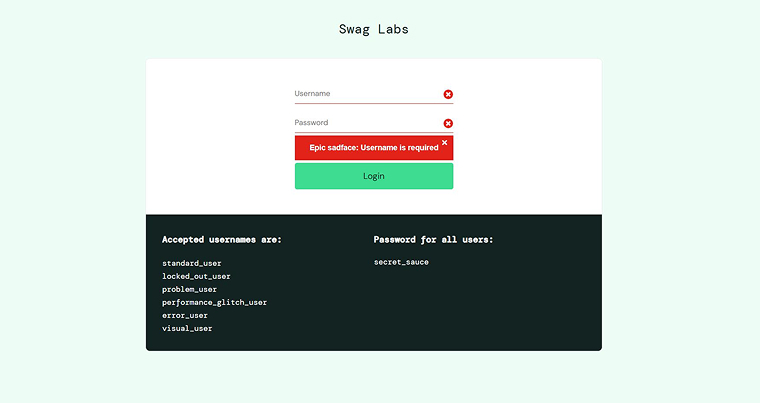
PAGE 1: LOGIN PAGE
The image given below shows the Suacedemo Website Dom Structure and the Login: username CSS Selector
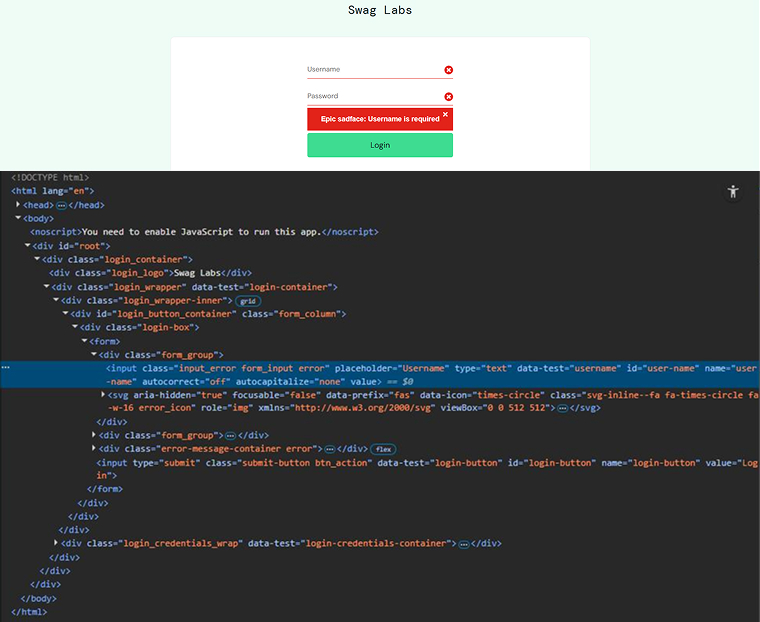
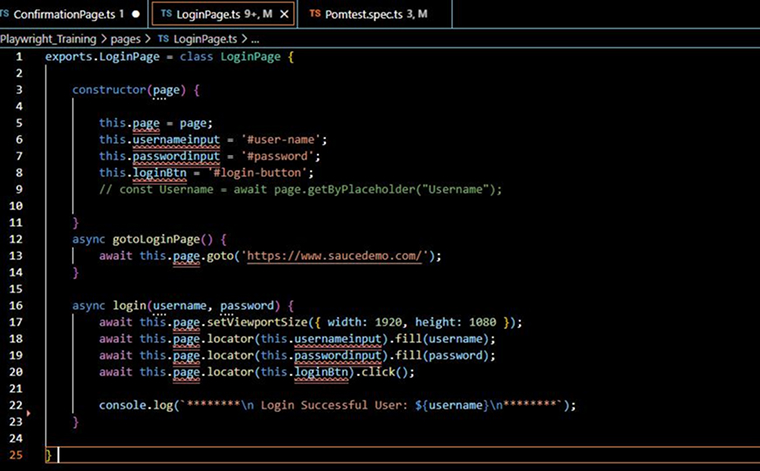
Below we have a Login Page under Locators, paths, and Methods are defined and used to fill user data.
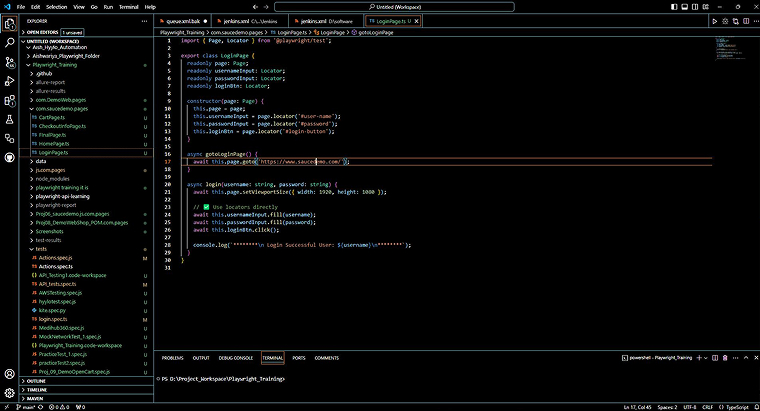
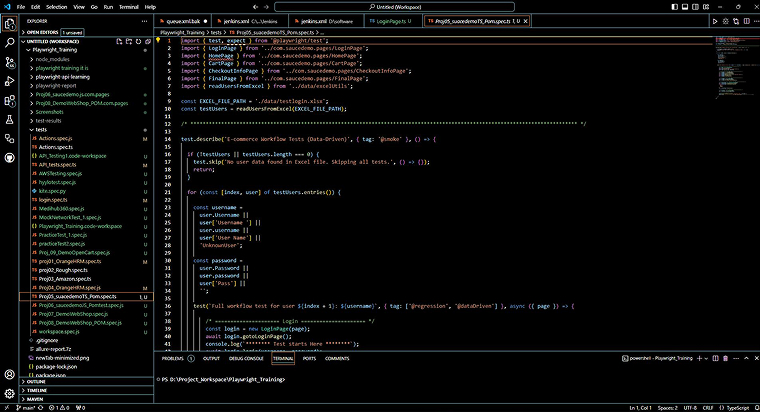
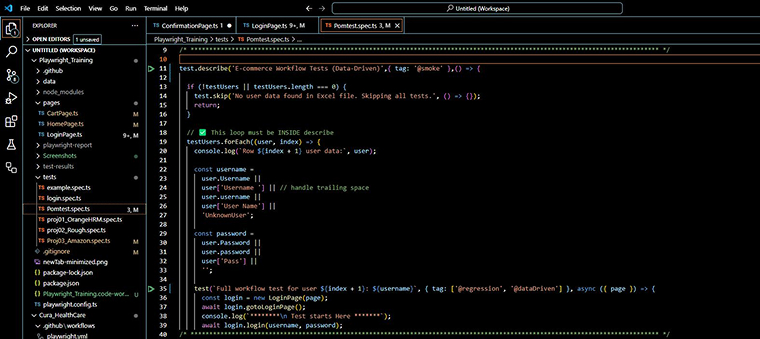
You can see the PomTest Script given below. It takes the username and password from the Data-Excel file.
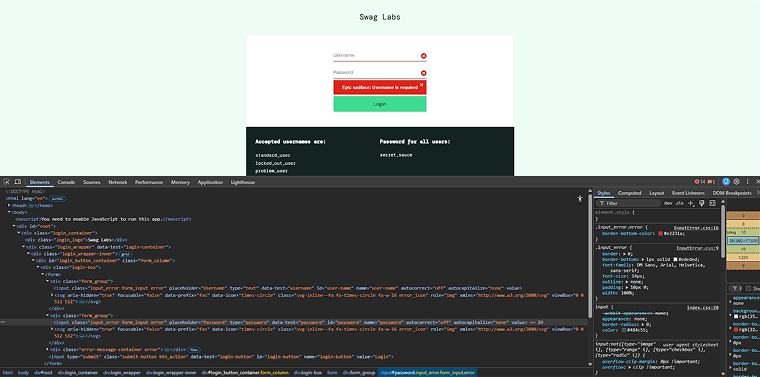
The image given below shows the Suacedemo Website Dom Structure and the Login: Password CSS Selector
Below we have a Login Page under Password Locator, and methods are defined and used to fill user data.
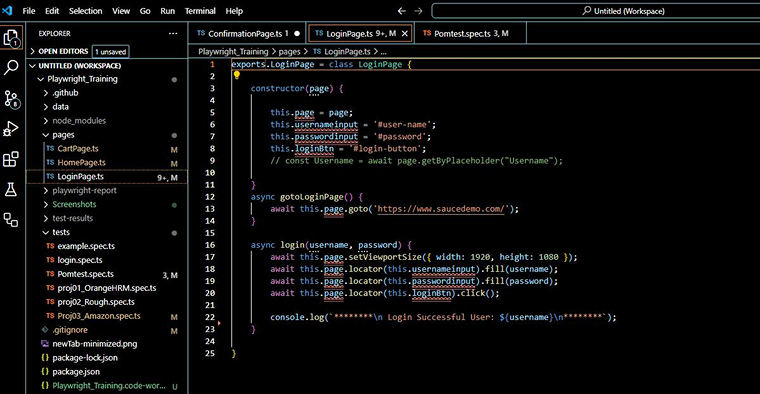
You can see the PomTest Script given below. It takes the password from the Data-Excel file.
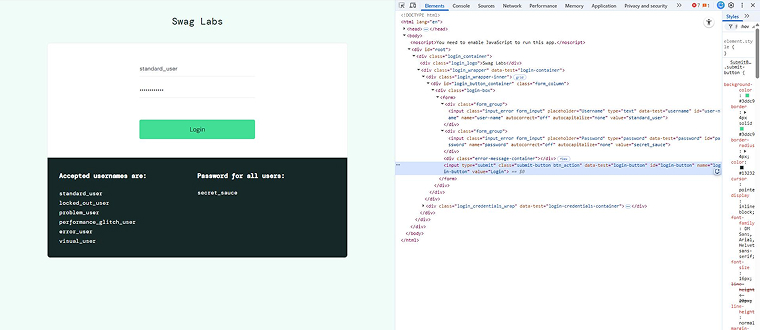
Now the user clicks the Login button to log in to his account.
Below is the Dom Structure Login Locator Shot:
Below Loginpage Code:
Here TestFile Code:

Results:

PAGE 2: HOME PAGE
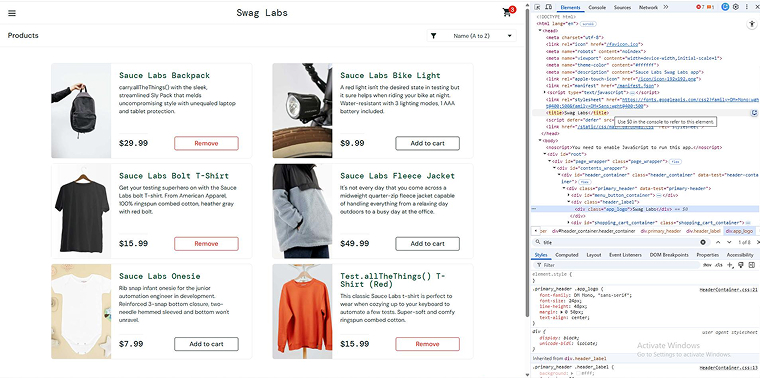
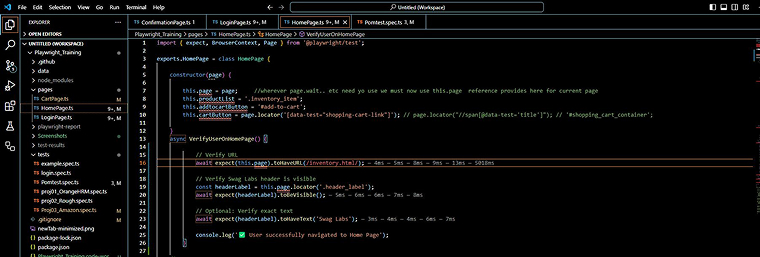
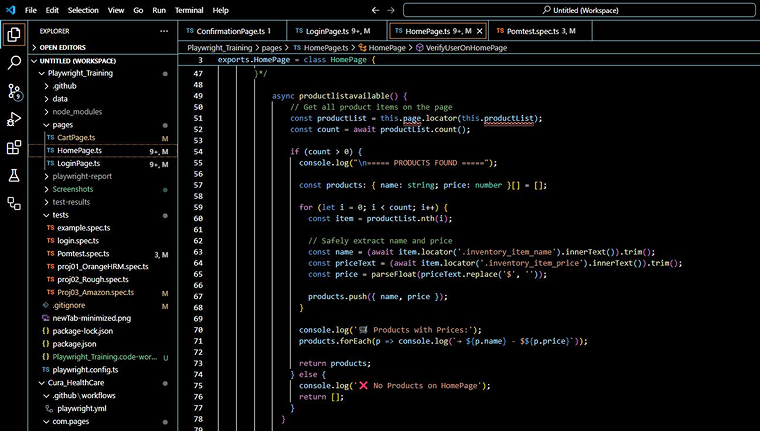
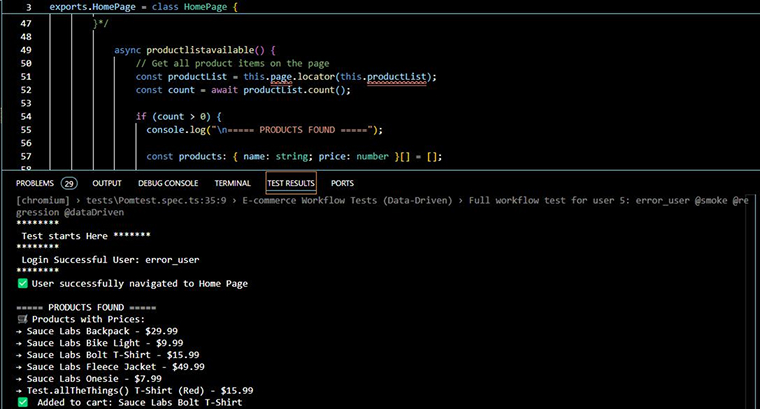
Check that the user can log in with correct credentials, access the homepage, view products, and add items to the cart.
Below are three brief points highlighting the Home Page:
- Verify Home Page Title
- Open the application and confirm that the Home Page title appears as expected.
- Dom Code:
- Homepage Code:
- TestFile Source Code:
- Verify Products Visibility
- Verify that the Home Page displays the Products section along with all listed product items.
- Validate Page Load
- Check that the Home Page loads fully and all main interface elements are available and functional.
- Results Here:
- Check that the Home Page loads fully and all main interface elements are available and functional.

PAGE 3: CART PAGE
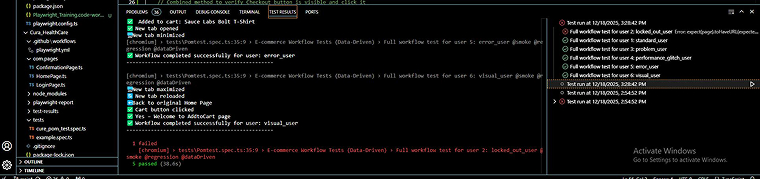
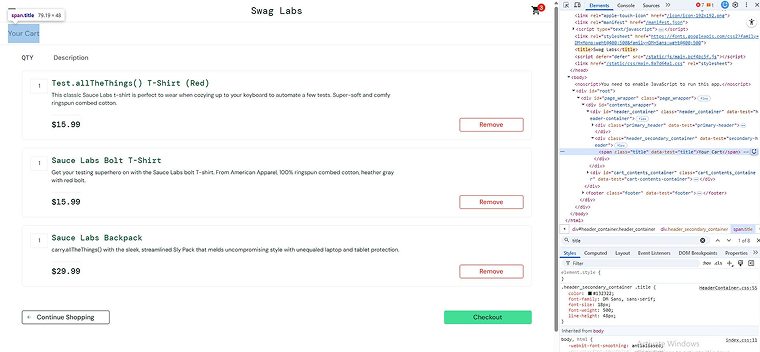
Confirm that a user can add a product to the cart, view the cart page title, and find the Checkout option.
Below are two brief points highlighting the Cart Page.
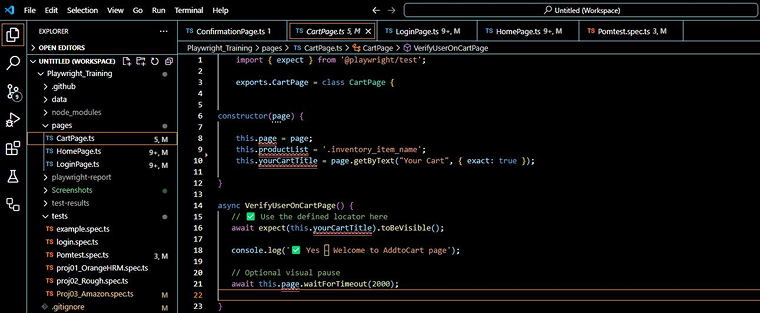
- Verify Cart Page Title
- Open the Cart page and check that the page title appears correctly using the DOM code and title locator path.
- CartPage Code to verify Cart Page Title:
- Results: Cart Page title and Checkout Button verified:
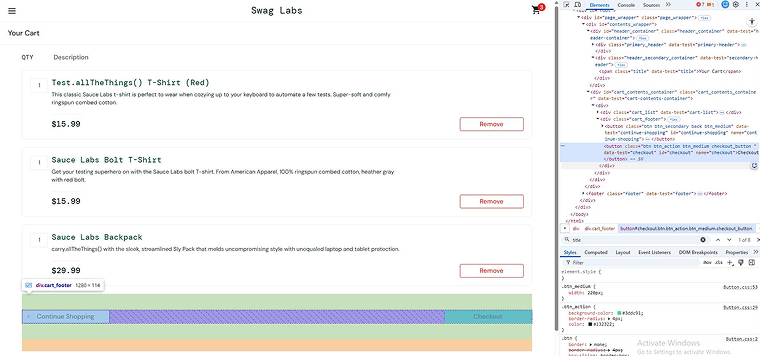
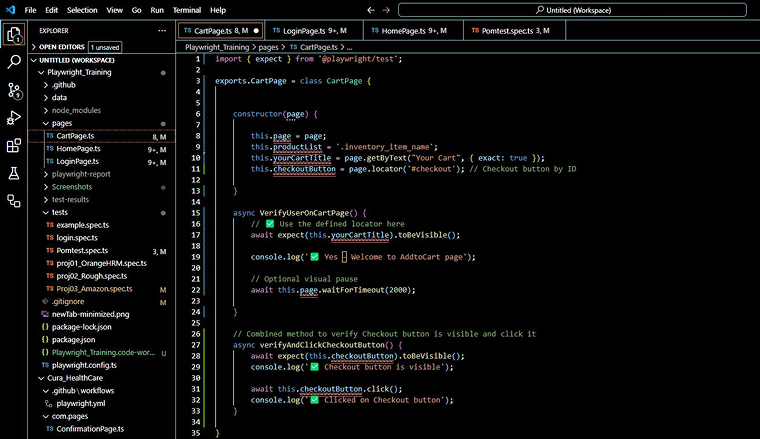
- Verify Products and Checkout Button
- Verify that the added products appear in the cart and that the Checkout button is present using the provided DOM and cart page codes.
- Verify that the added products appear in the cart and that the Checkout button is present using the provided DOM and cart page codes.
- Results:
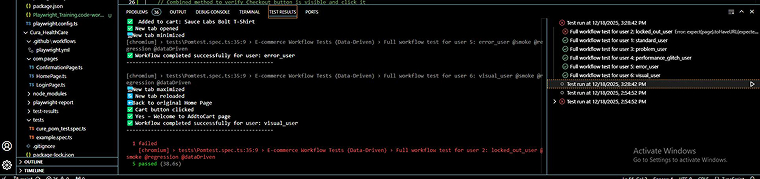
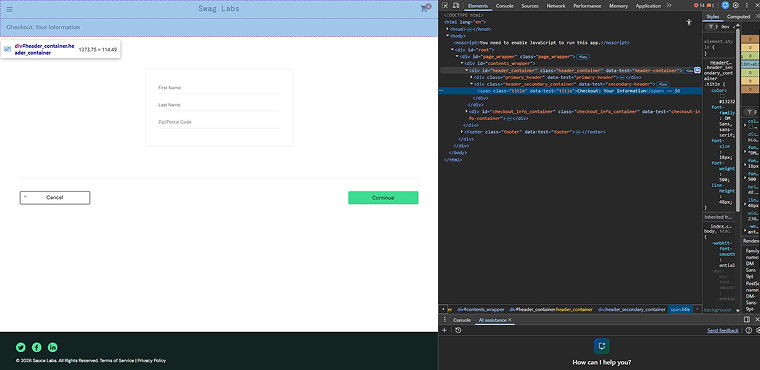
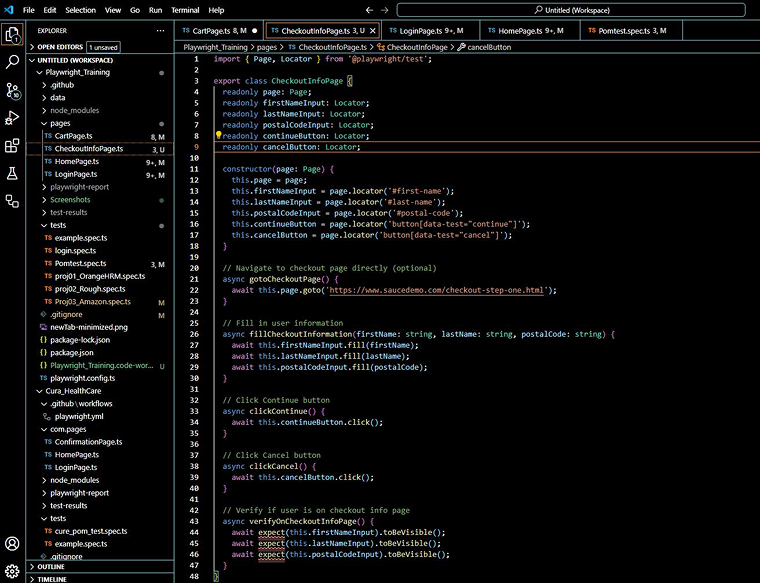
PAGE 4: CHECKOUT INFO PAGE
- Verify Cart Page Title
- Launch or navigate to the Cart page.
- Validate that the page title is displayed correctly using the DOM code and title locator path.
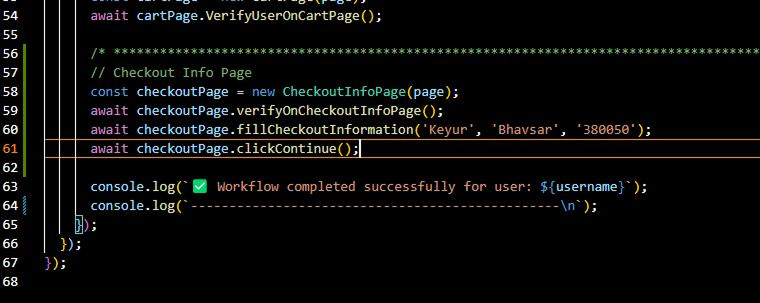
- Here is the TestFile Code:
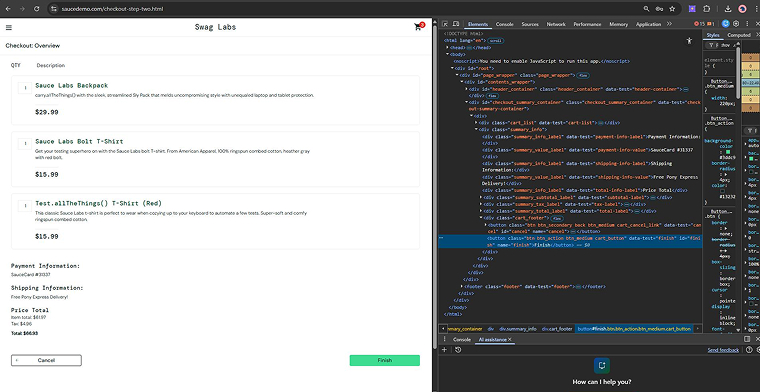
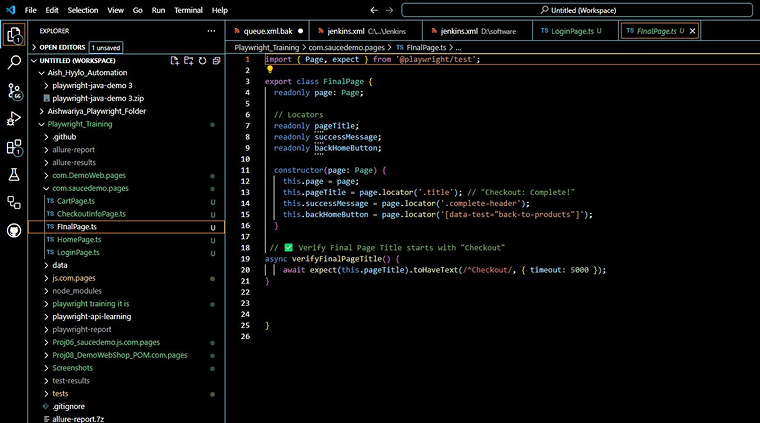
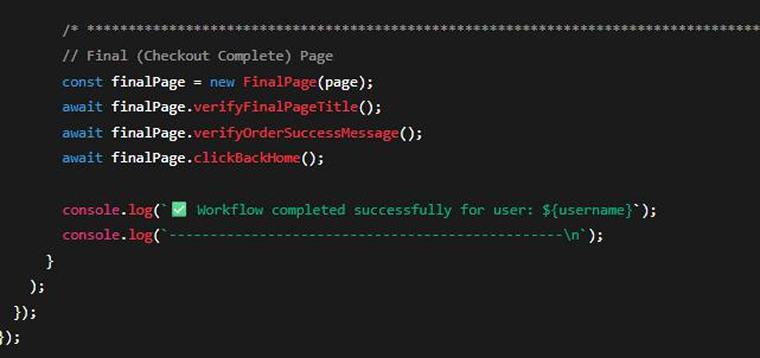
PAGE 5: FINAL PAGE
- Verify Checkout Complete Page
- Check that after clicking Finish, the Checkout Complete page shows the correct title and success message using the provided DOM code.
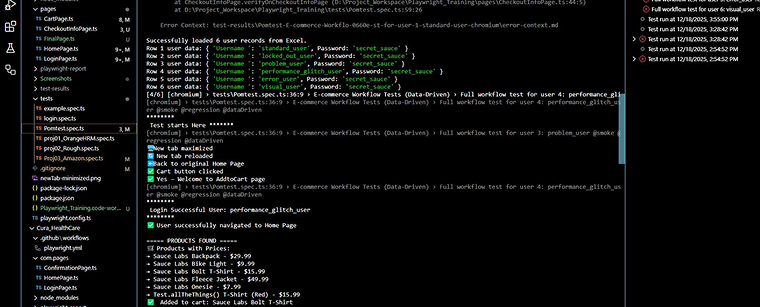
TEST PASS RESULTS:
Tools for Test Scripting
Take a look at the following five popular tools used for developing test scripts:
- Selenium: It is an open-source tool for automating web application testing. It supports multiple programming languages, including Java, Python, and C#. Testers can simulate user actions, verify functionality, and run scripts efficiently across different browsers.
- JUnit/TestNG: These are frameworks for writing automated unit tests in Java. They help organize, execute, and validate code behavior. Testers can quickly check individual functions and identify issues early in the development process.
- TestComplete: TestComplete by SmartBear is a commercial tool for automating tests on web and desktop apps. It offers record-and-playback features and supports multiple programming languages, allowing testers to create scripts without extensive coding knowledge.
- Postman: It is a tool for testing APIs. It allows testers to send requests, verify responses, and automate repetitive API tests. Postman simplifies and accelerates backend service testing without requiring extensive coding.
- Cucumber: Cucumber allows writing tests in plain language using Gherkin. It supports behavior-driven development, making scripts readable to both technical and non-technical team members. It bridges communication between testers, developers, and business teams.
Challenges in Test Scripting
Test scripts play a crucial role in software testing. However, they come with certain challenges, such as:
Balancing Automated and Manual Testing
Automation is useful but not perfect. Some problems are better detected by people. Repeated and stable tests are well-suited for automation. Visual checks and user experience assessments require manual effort. Setup time also matters. Tests that change frequently are harder to automate. Choosing the right method depends on effort, purpose, and long-term value.
Maintenance and Updates
Software changes frequently, so test scripts must be updated accordingly. Old scripts can produce incorrect results. Regular reviews help maintain their accuracy. A modular design simplifies updates. Version control tracks every change. Continuous Integration (CI) tools support seamless updates. Some automation tools can handle minor changes automatically. Proper maintenance keeps tests reliable and prevents missed defects.
Test Data Management
Handling test data can be challenging. Different scenarios require different inputs. Poor data management leads to failures. Organized data sets help scripts run smoothly and support accurate testing across various conditions.
Poor Documentation
Test scripts require clear explanations to be effective. Providing detailed notes and using simple logic reduces confusion. Storing all scripts in a shared repository keeps everything organized. This allows new testers to understand the process more quickly, avoiding delays and eliminating reliance on a single individual during testing.
Best Practices for Writing a Test Script
The following are the six popular best practices for effectively writing test scripts:
Unambiguous and to the Point
A good test script must be clear and simple. Each step should describe one action. Inputs and expected results must be stated clearly. The language should be easy for anyone to understand, which helps avoid confusion and repeated questions. Well-written test scripts save time, reduce errors, and enable all team members to follow the testing process smoothly.
Parametrization
Parameterization makes testing faster and easier. Testers can reuse a single script across multiple environments by simply changing the input values. This reduces repetitive work and increases the flexibility of the automation. Errors become easier to manage, saving both time and effort. As a result, teams can test more cases using the same code. It also supports quick updates during frequent test runs.
Integrate Automation into CI/CD Pipelines
Automated tests should run automatically during the build process to allow quick verification of new code. This ensures problems are detected early, providing developers with fast feedback. Continuous testing improves software quality, reduces delays, and makes the software more stable. As a result, teams gain confidence in every update.
Design From the User’s Perspective
Test scripts should be written with the user in mind. Consider how users explore the app, as they may take multiple paths. Some actions might be incorrect. Tests should cover normal usage, error conditions, and unusual behavior to ensure the system functions correctly.
Include Comments Within Test Script
Comments make test scripts easier to understand by explaining the purpose of each step. This helps new testers learn faster and simplifies debugging. However, too many comments can confuse readers. Therefore, only explain complex logic. Clear and balanced comments improve script quality and facilitate long-term maintenance.
Version Control
Test scripts evolve as applications grow. Version control helps manage these changes securely by clearly recording every update. It enables teams to collaborate efficiently and allows restoration of previous versions when needed. This approach keeps tests reliable, organized, and consistent throughout the development and release process.
Final Thoughts
In the software testing process, test scripts play a crucial part in ensuring quality and reliability. They provide a clear, step-by-step guide for testers to follow, whether testing manually or through automation. By using well-structured scripts, QA teams can verify that each feature works as intended, reduce human error, and avoid missing important steps. Using test script templates and best practices further improves efficiency and saves time, especially in large projects with complex functionality. Well-crafted scripts are more than documentation; they are a powerful tool that strengthens the testing process and enhances the QA team’s work more effectively.
FAQs
UAT test scripts provide clear steps for business users to verify that the software performs correctly in real-world scenarios.
Test data consists of inputs used to test software, while a test script is a set of instructions that guide how to perform the test and validate expected results.
Automated test scripts are typically written in languages such as Java, Python, or JavaScript. Tools such as Selenium, Cypress, and Playwright provide control and support for custom logic, loops, and conditional statements.

Badal Patel is a Project Manager at TatvaSoft, overseeing a large team of software developers and ensuring the highest quality standards throughout the development process. He has over ten years of experience delivering reliable solutions across various industries.



Comments
Leave a message...