


Businesses are under constant pressure to move faster, innovate more, and minimize costs at the same time to demonstrate their competency in this digital world. It is no longer feasible to host everything in-house, especially when it comes to hiring top-notch talent with the continuous evolution of emerging technologies. Here comes the role of IT outsourcing services that provide companies with a flexible and efficient way to access expert talents, scale operations, and remain competitive without overburdening in-house teams.
Today, outsourcing has become a preferred strategic choice of companies and not just a measure to cut down costs. According to Statista, the CAGR of the IT outsourcing market is projected to be 6.20% from 2026 to 2030, resulting in a market volume of US$806.55bn by 2030. But, as we’ll know, every solution comes with its own set of challenges. The Outsourcing market comprises various models based on location and type of services. Therefore, it becomes quite problematic and even exhausting to select the appropriate one.
This blog explores all the facets of IT Outsourcing, ranging from its objectives, advantages & disadvantages of outsourcing, service models, location-based outsourcing, and factors to consider while selecting the service model.
What is IT Outsourcing?
IT outsourcing is the practice of hiring an external service provider or outsourcing vendor from your native or any foreign country to handle some or all of your company’s technology functions. You contract a third-party company, they assign qualified professionals, and those professionals deliver the agreed-upon IT work on your behalf.
The scope of IT outsourcing can be both narrow and broad. You can outsource a single function, like help desk support, or even hand over entire operations, such as software development, cloud infrastructure, cybersecurity, or network management. The outsourcing provider can work from your office, from their own facility, or from another country entirely.
There are two ways outsourcing typically works:
- Fully Managed: The provider takes complete ownership of the IT function. They plan, execute, monitor, and maintain the entire development task. Your involvement is limited to setting expectations and reviewing results.
- Co-Managed: The provider fills specific gaps in your existing IT team. Your internal staff handles some responsibilities while the external team covers the rest. You closely supervise the overall process.
What separates IT outsourcing from general outsourcing is the focus on technology-specific tasks. Here, you’re not outsourcing payroll or customer service responsibilities. You’re outsourcing software builds, server operations, security monitoring, data management, and technical support. The provider brings specialized tools, certified engineers, and delivery processes that most companies would need years to develop internally.
What is the Goal of IT Outsourcing?
IT outsourcing aims to get specific technology work done by people better equipped to handle it, while your internal team stays focused on what your business actually sells.
That sounds simple, but it plays out in several practical ways:
- Fill Skill Gaps without Long Hiring Cycles: If your project needs a Kubernetes specialist or a team of React developers, you may face multiple challenges resulting in months of delay. An outsourcing provider can have qualified people working on your project within weeks, or sometimes days.
- Cut Ongoing Employee and Infrastructure Costs: Maintaining a full in-house IT team means allocating sufficient budget for salaries, benefits, office space, training, and software licenses. Outsourcing converts all these fixed costs into variable ones. Here, you need to pay only for the work you need from the outsourcing vendor at the time of the requirement.
- Free Your Team From Repetitive Operational Work: Tasks such as server monitoring, patch management, help desk tickets, and backup verification consume hours. Outsourcing these functions lets your internal engineers utilize their time and knowledge on productive tasks such as product development, architecture decisions, and customer-facing features.
- Access Tools and Processes You Haven’t Built Yet: Most outsourcing providers are well-equipped with CI/CD pipelines, automated testing frameworks, security monitoring setups, and cloud management practices. Setting up such in-house infrastructure requires time and investment that many companies can’t justify for a single project.
- Scale Capacity Up or Down Based on Actual Demand: A product launch might need 15 engineers for three months, then another 5 months for routine maintenance. Outsourcing lets you adjust team size without layoffs or rushed hiring rounds.
The goal of outsourcing is not just limited to cost savings; it goes much beyond that. Companies that properly outsource their tasks can benefit from faster product shipping, respond to market shifts without restructuring their teams, and maintain technical standards through domain-expert providers who specialize in specific domains. Thus, we can say that outsourcing is a resource strategy, not a cost-cutting shortcut.
What Are the IT Outsourcing Service Models?
IT outsourcing service models define the structure of your engagement with the outsourcing service provider. These models determine who manages the team, who owns the deliverables, and how much control you retain over the development process.
The following three models dominate the industry, and each serves a different business situation.
Project-Based Outsourcing
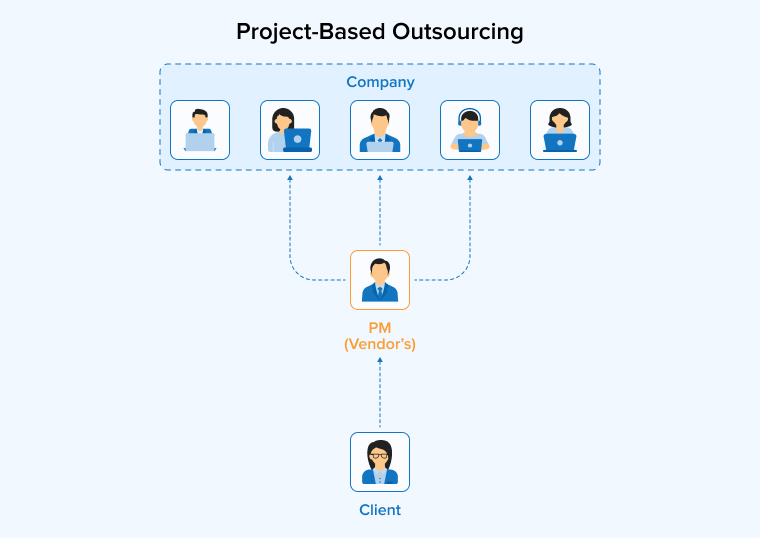
In project-based outsourcing (also called full-process outsourcing), the vendor takes complete responsibility for the entire development lifecycle. You only define the requirements and timeline upfront. The vendor then assembles the team, manages the work, handles quality assurance, and delivers the final product.
The project-based outsourcing model is the most suitable one when:
- Your project has a clearly defined scope, fixed budget, and project deadline.
- You don’t have an in-house IT team, or your team lacks the required technical expertise.
- You want minimum involvement in day-to-day project management.
Who Manages the Project: The vendor’s project manager is completely responsible for the entire project, as the manager guides and handles the whole process. Your involvement is limited to approving milestones, reviewing progress in scheduled meetings, and validating the final deliverable.
Payment Structure: Typically, a fixed price based on the agreed scope, or time-and-material billing for projects whose requirements may shift during development.
The downside associated with this model is limited flexibility. If requirements change after the project kicks off, both the timeline and cost will need revision. This model works best when you can document exactly what you need before the engagement starts.
Dedicated Team Model
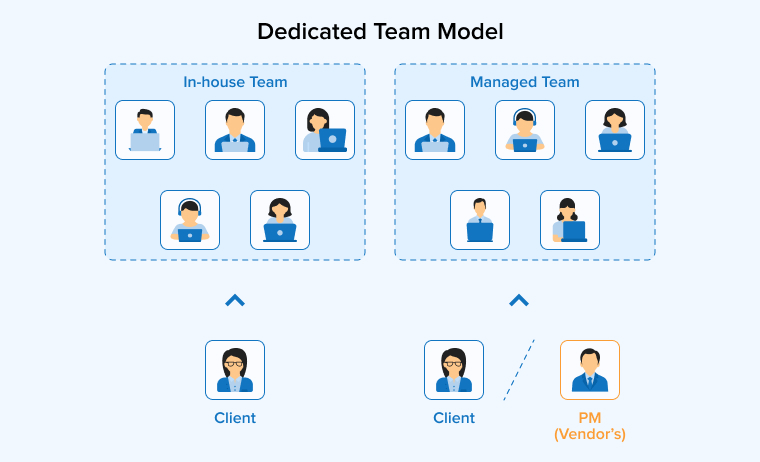
The dedicated team model (sometimes called a managed team) gives you an entire group of IT professionals working exclusively on your product. The vendor assembles the team, but the team operates under your direction. They don’t get integrated into your in-house staff but function as an independent unit that collaborates with your team on a shared project scope.
This model fits when:
- Your project will run for 6 months or longer, and the scope will evolve.
- You already have an in-house IT department and need an external team to handle a parallel workstream.
- You want to retain decision-making authority on features and priorities while delegating daily team coordination to the vendor.
Who Manages the Project: In this model, project management is a shared responsibility. The vendor’s PM handles team coordination, sprint planning, and resource allocation while your PM or product owner controls priorities, approves features, and reviews deliverables.
Payment Structure: Monthly fee per team member, covering salary, taxes, benefits, infrastructure, and the vendor’s management overhead.
The dedicated team model builds deep product knowledge over time. Team members learn your codebase, get familiar with your business domain, and technical standards. This continuity produces better output than rotating developers across short engagements.
Staff Augmentation
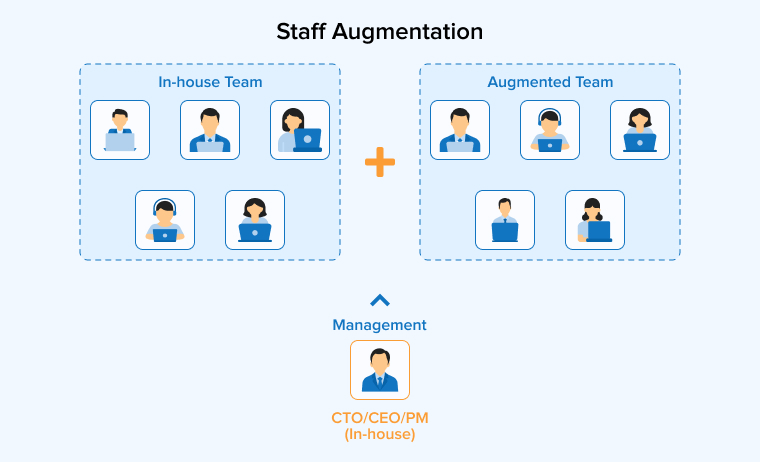
Staff augmentation adds individual external specialists directly into your existing team. In this model, the teams work alongside your in-house employees, follow your organization’s processes, use organization-wide accepted tools, and report to your managers. The vendor handles sourcing, vetting, and employment logistics while everything else is under your control.
Staff augmentation is the right choice when:
- You need a specific skill set (a senior DevOps engineer, a React Native developer, a QA lead) for a defined period of time.
- A team member leaves unexpectedly, resulting in an urgent need for a qualified replacement.
- Your team needs extra capacity for a product launch or a time-sensitive sprint without committing to permanent hires
Who Manages the Project: The project management responsibility falls entirely with you. The augmented specialists work under your direct supervision, just like your regular in-house employees. The vendor’s role ends after placing the resource and handling administrative tasks like payroll and contracts.
Payment Structure: The payment is calculated either on an hourly or daily rate per specialist based on the actual hours worked, ensuring that the cost remains variable and directly aligned with usage.
Staff augmentation gives you maximum control with minimum commitment. It works equally well for short-term and long-term needs, and you can scale up without restructuring your team.
What Are the Types of IT Outsourcing Based on Location?
The geographic relationship between your company and the outsourcing provider shapes cost, communication speed, cultural alignment, and how easily you can conduct in-person meetings.
There are mainly three location-based IT outsourcing service models, each having its own advantages that must be understood before adoption:
Onshore Outsourcing

Onshore outsourcing (also called domestic outsourcing) means hiring an external provider within the same country. A company based in Chicago working with a development firm in Austin is a typical onshore arrangement.
Best Suited For: Projects requiring strict regulatory compliance (HIPAA, SOX), high-security clearance work, or engagements where daily face-to-face collaboration is a hard requirement.
Advantages of Onshore Outsourcing:
- You share the same language and business culture, so there’s almost no friction in daily communication. Both parties understand the same professional norms and working styles.
- Both parties operate under the same legal jurisdiction. This makes contracts, Intellectual Property (IP) protection, and regulatory compliance easy to manage.
- There’s no need to take a flight across the globe for in-person meetings. You only need to make a phone call to arrange and conduct meetings. Site visits and whiteboard sessions happen on short notice when such a need arises.
- Because your teams work the same hours, miscommunication on project requirements stays minimal. Feedback loops are fast, and queries get resolved the same day.
Disadvantages of Onshore Outsourcing:
- It is one of the highest costs compared to all three location-based outsourcing models. Hourly rates for U.S.-based developers start at $60 and frequently exceed $150.
- The talent pool here is quite limited compared to offshore or nearshore markets.
- The cost-benefit ratio is lower compared to the benefits obtained from building an in-house team.
Offshore Outsourcing
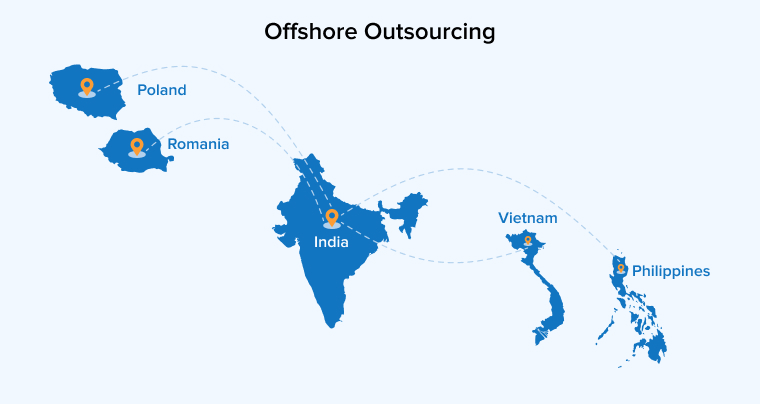
Offshore outsourcing means contracting with a provider in a geographically distant country. India, the Philippines, Vietnam, Poland, and Romania are among the most established offshore outsourcing destinations. The provider operates from their own facilities and manages work delivery remotely.
Best Suited For: Large-scale development projects, long-term product maintenance, and organizations that prioritize cost efficiency and have experience managing distributed teams. Companies like Google, Slack, and WhatsApp have all used offshore talent during critical growth phases.
Advantages of Offshore Outsourcing:
- The cost difference is substantial. Offshore IT rates range from $10 to $50 per hour, depending on the region, which translates to 50% to 70% savings compared to onshore pricing.
- You gain access to a massive global talent pool with deep specialization in software development, QA, DevOps, and infrastructure management. Countries like India produce hundreds of thousands of skilled IT professionals every year.
- When time zones are structured with overlapping shifts, offshore teams can keep development moving around the clock. Your morning starts with completed work from the previous night’s sprint.
Disadvantages of Offshore Outsourcing:
- Time zone gaps of 8 to 12 hours can delay feedback loops and slow decision-making.
- Cultural differences and language barriers require extra management efforts.
- Less visibility into day-to-day work without strong reporting and communication protocols.
Nearshore Outsourcing
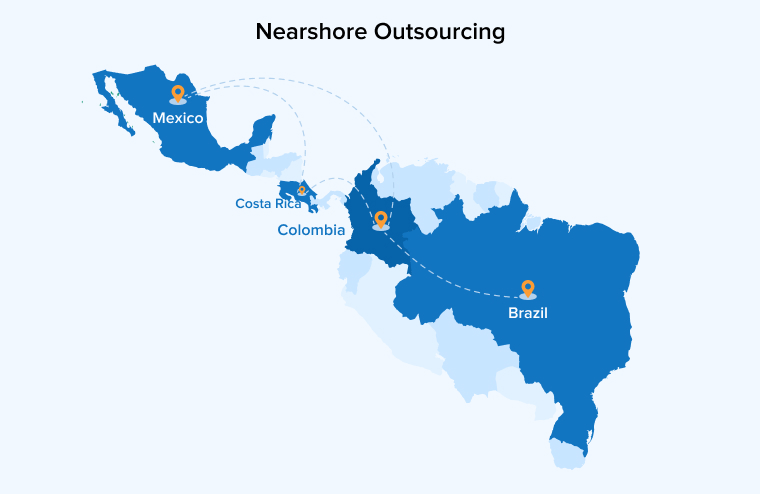
Nearshore outsourcing involves partnering with a provider in a neighboring country or a nearby region. For U.S. companies, this typically means Latin America, i.e., Mexico, Colombia, Brazil, Argentina, or Costa Rica. For European companies, Eastern Europe and the Baltic states are common nearshore destinations.
Best Suited For: Agile projects that depend on daily standups and fast feedback loops, companies looking to balance cost savings with collaborative convenience, and organizations that have struggled with communication issues in previous offshore engagements.
Advantages of Nearshore Outsourcing:
- Time zone overlap of just 1 to 3 hours makes real-time collaboration easy during shared business hours. Daily standups and sprint reviews happen without anyone joining a call at midnight.
- Cultural and professional alignment between neighboring countries reduces friction in communication and project management. Teams share similar work ethics and business expectations.
- Rates run approximately 40% to 50% lower than onshore vendors. You get meaningful savings without giving up the proximity that keeps collaboration smooth.
- When you need a periodic on-site visit, it’s a short flight away. Face-to-face workshops and kick-off meetings are practical rather than logistically painful.
Disadvantages of Nearshore Outsourcing:
- Costs are higher than offshore outsourcing but still lower than onshore outsourcing.
- The talent pool is smaller than major offshore hubs like India or the Philippines.
- Available skill sets differ based on the country’s tech ecosystem maturity and specific industry focus.
What Are the Areas of IT Outsourcing?
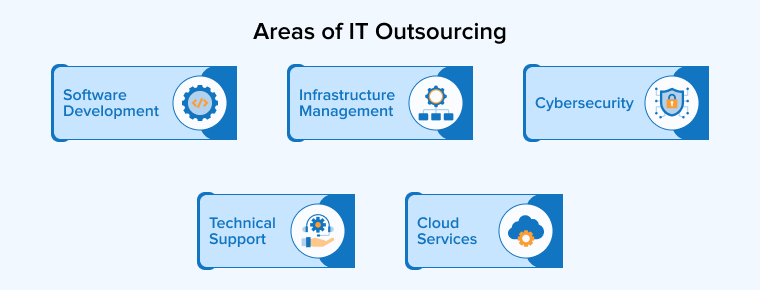
Beyond choosing a location and engagement model, you need to decide which IT functions to outsource. Here are the five areas companies outsource most frequently.
Cloud Services
This covers cloud migration, infrastructure setup, ongoing management, and cost optimization across platforms like AWS, Azure, and Google Cloud. According to Global Growth Insights, over 54% of firms now use hybrid cloud outsourcing models. Managing multi-cloud environments requires specialized knowledge that most internal teams don’t have, making this a common outsourcing choice.
Cybersecurity
With a global cybersecurity talent shortfall of 4.8 million positions, companies increasingly outsource threat monitoring, incident response, vulnerability testing, and compliance management. Outsourced security teams help organizations stay aligned with GDPR, HIPAA, PCI DSS, and SOX requirements without building a full internal security operations center.
Software Development
Custom software development remains the most commonly outsourced IT function. This includes web apps, mobile apps, APIs, enterprise platforms, and SaaS products. Software outsourcing is growing at a compound annual rate of 11.5%, making it the fastest-expanding segment. Companies outsource development to ship faster, access specific tech stacks, and scale engineering capacity without permanent headcount increases.
Infrastructure Management
This includes data center operations, network monitoring, server maintenance, storage management, and disaster recovery. Infrastructure outsourcing accounted for over 45% of the IT outsourcing market in 2025, driven by the need for 24/7 monitoring, uptime guarantees, and regulatory compliance. It lets organizations reduce capital spending while keeping their systems reliable and secure.
Technical Support
Outsourced technical support covers help desk services, desktop support, application troubleshooting, and end-user assistance. This is one of the most established outsourcing areas, and it allows companies to provide around-the-clock support without staffing multiple shifts internally. Providers operate under defined SLAs with clear response and resolution times.
What Are the Benefits of IT Outsourcing?
Choosing the right type of IT outsourcing delivers measurable advantages. Let’s see what the Reddit community has to say about the benefits of IT Outsourcing:
What are the Benefits of Outsourcing and How It Improves Your Bottom Line?
by u/yuhooo12 in growmybusiness
Here are the five benefits of IT outsourcing that matter most to enterprises.
Cost Reduction and Savings
Outsourcing cuts labor and infrastructure expenses by 25% to 70%, depending on the model. Offshore outsourcing delivers the highest savings, with cost benefits that go beyond hourly rates. You also eliminate recruitment fees (up to 25% of salary for tech roles), relocation costs, workstation setup, benefits packages, and ongoing HR overhead. For a $60,000 tech role, these savings can add up to $20,000+ per hire.
Scaling Staff with a Dedicated Team
Suppose you need 5 developers next month and 2 the month after. Outsourcing gives you that hiring flexibility without long-term commitments. You can scale up for a product launch and scale back once the sprint is done. This is especially valuable during seasonal demand spikes or when you’re running parallel projects that would stretch your internal team too thin.
Increased Productivity and Focus on Core Business
When your internal engineers stop handling infrastructure tickets or routine maintenance, they focus on what actually drives revenue, i.e., product development, customer-facing features, and strategic initiatives. Outsourcing the operational work creates space for your best people to do their best work.
Security and Accountability
Reputable providers invest in ISO 27001, SOC 2, and CMMI Level 3 certifications. They operate under structured SLAs with defined reporting cycles, escalation paths, and audit trails. For many mid-sized companies, partnering with a certified outsourcing provider actually improves their security posture compared to managing everything internally with limited resources.
Access to Essential Functions
Outsourcing gives you access to capabilities that would take years and significant investment to build in-house. These include AI and machine learning integration, cloud-native architecture design, DevOps pipeline setup, automated testing frameworks, and microservices engineering. Instead of building centers of excellence from scratch, you partner with a team that already has the expertise.
How Do You Choose the Right Type of IT Outsourcing?
There’s no universal answer to this question. The right model depends on your specific situation, which is determined by multiple factors such as:
- Project Requirements: If you have a detailed specification and fixed scope, go for the project-based outsourcing model. If your product will evolve, a dedicated team gives you the flexibility to adjust priorities as you learn.
- Project Estimate: Fixed budget projects pair well with fixed-price contracts and offshore providers. If you need flexibility to adjust scope, time-and-material arrangements with a nearshore partner offer a middle ground.
- Degree of Control: Think and decide about the level of control you want over the development process and team members. Staff augmentation gives you maximum control because the people work within your team. Dedicated teams offer shared control, whereas project-based outsourcing hands operational control to the vendor.
- Compliance Requirements: Regulated industries such as healthcare and finance may require onshore providers or partners with specific certifications (ISO 27001, SOC 2, HIPAA). Verify these before signing any agreement.
Wrapping Up
IT outsourcing is not just about reducing the company’s workload but about making smart decisions. When used thoughtfully, it helps companies stay agile, manage risks, and access the right skills at the right time. The key is to understand priorities and choose an approach that aligns with your project goals, budget, and level of involvement in the management. With the right selection of outsourcing vendors, the company can benefit from long-term growth and stability provided by outsourcing.
FAQs
A financial services company contracts an offshore development firm to build a custom payment platform. The provider handles requirements analysis, UI/UX design, backend engineering, QA testing, and deployment. The financial company stays focused on its core banking operations while the external team handles the technical build.
The five primary areas of IT outsourcing are:
1. Cloud services (migration, management, optimization)
2. Cybersecurity (threat monitoring, compliance, incident response)
3. Software development (web, mobile, enterprise, SaaS applications)
4. Infrastructure management (data centers, networks, servers, disaster recovery)
5. Technical support (help desk, desktop support, end-user troubleshooting)
IT Outsourcing provides multiple advantages, including cost reduction, access to specialized talent, a scalable workforce that adapts to changing demands, faster time-to-market, security, and compliance with standards like ISO 27001, and flexible resource redirection.
Companies face challenges like communication gaps due to time zone and cultural differences, data security and compliance risks, consistent quality maintenance across remote teams, and integration difficulty between outsourced and internal processes while outsourcing.

Itesh Sharma is core member of Sales Department at TatvaSoft. He has got more than 6 years of experience in handling the task related to Customer Management and Project Management. Apart from his profession he also has keen interest in sharing the insight on different methodologies of software development.



Comments
Leave a message...