

Software testing is a critical stage of developing stable and reliable software applications. However, the important thing here is that traditional methods often struggle to keep up with today’s fast release cycles and growing system complexity. The gap between faster releases and effective testing is being filled by Artificial Intelligence. AI has brought automation into testing processes, handling repetitive tasks, analyzing large amounts of data, and detecting patterns that humans might miss.
Owing to the widespread benefits, many organizations offering software testing services have started integrating AI into their software testing processes. This shift from relying only on traditional testing to AI testing is helping teams improve productivity, increase test coverage, and respond more quickly to changing user expectations.
In this blog, we’ll explore all the facets of AI in software testing: its pros and cons, use cases and applications, AI test automation tools, and future testing trends.
What is AI in Software Testing?
AI in software testing is a smart testing approach that uses advanced technologies such as machine learning, natural language processing (NLP), and data analysis to ensure simple and efficient software testing. It’s not like traditional automation testing working on fixed test scripts; instead, it can learn from past data, recognize patterns, and adjust to changes in the application. AI-based testing is self-sufficient to generate and improve test cases, identify duplicate or low-value tests, and focus on high-risk areas that require proper attention.
What Are the Benefits of AI in Software Testing?
AI-powered software testing improves the quality of software testing results in multiple ways:
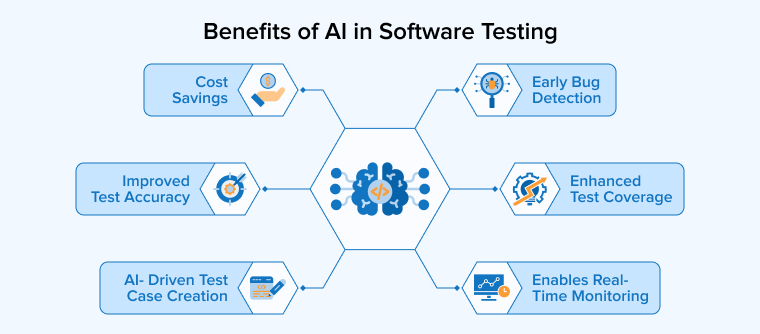
Improved Test Accuracy
AI improves testing by running automated checks with consistent accuracy. It repeats tests without errors and efficiently handles large datasets. It detects visual issues and predicts risks early, reducing defects and maintaining software quality.
Cost Savings
AI-based testing reduces expenses by automating routine activities and accelerating test creation. Teams need fewer specialists because the system maintains and updates test scripts automatically. Broader coverage comes with less effort. Companies that adopt smart codeless automation often reduce overall testing costs up to 70%.
Enhanced Test Coverage
AI reviews user activity, system logs, and past defects to identify areas that tests ignore. It creates new scenarios to close those gaps and strengthen coverage. Teams run tests more frequently and catch hidden bugs sooner. Developers fix patterns early and improve product quality.
Enables Real-Time Monitoring
AI tracks application activity during runtime by analyzing logs and user actions. It learns what normal performance looks like and quickly flags unusual changes. Teams receive alerts before users notice problems. The system also detects gradual performance declines and forecasts future risks based on historical data. This helps maintain stable performance and ensure a smooth user experience.
Early Bug Detection
AI testing tools identify issues early by analyzing historical results and code trends. They highlight risky areas and explore uncommon scenarios. Developers fix problems before release. Early detection reduces repair costs and prevents defects from reaching users.
AI- Driven Test Case Creation
AI studies how an application works and automatically creates test cases. It explores complex paths and unusual scenarios that people might overlook. As a result, teams can design and execute more tests in less time. This approach enhances coverage and improves overall software quality.
How to Perform AI Testing?
AI software testing requires a systematic approach, which includes the steps below:
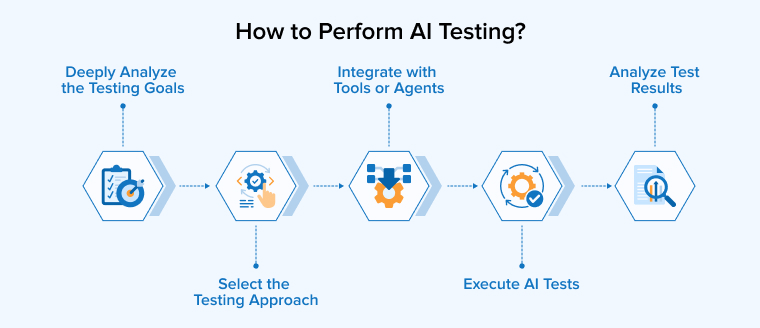
1. Deeply Analyze the Testing Goals
Select testing activities that benefit from automation and data analysis. Use AI to write test cases, forecast defects, validate visuals, and examine complex workflows. Focus on repetitive and logic-driven areas where intelligent tools can improve efficiency.
2. Select the Testing Approach
Choose AI-powered testing tools that enhance your current automation or enable intelligent agents to run tests independently. Train these systems using logs, defect history, user activity, and recent code updates. This data helps them identify trends and flag risky areas. Platforms like Testim and Functionize can automatically create tests based on real application behavior and workflows.
3. Integrate with Tools or Agents
Connect AI testing tools to your CI/CD workflow and test framework. Provide them with requirements, user stories, logs, and scripts. Allow the system to learn from each run and progressively improve speed, accuracy, and coverage.
4. Execute AI Tests
An AI agent runs automated tests and generates new test scenarios, prioritizing critical modules and recent updates first. It repairs faulty test scripts and flags unusual outcomes. Machine learning analyzes risk patterns to determine the testing order. This approach saves effort and uncovers defects more quickly.
5. Analyze Test Results
Teams review outcomes from the AI agent and study weak areas. They add more tests where gaps appear and then tune the system settings accordingly for better results. This cycler needs to be repeated multiple times to ensure that the software remains reliable and functional with its increasing size and complexity.
What Are the Types of AI Testing?
The four major categories of AI software testing are:
Regression Testing
When developers update software or retrain a model, AI identifies recent changes and past defects to find fragile areas. It prioritizes the most important tests first, and teams run regression tests to confirm that existing features still work. They also verify that new model versions behave correctly and do not create hidden problems.
Functional Testing
Functional testing checks how a system responds to specific inputs and verifies that it produces the correct outputs. Teams compare results with expected requirements to ensure the application performs each task properly. For example, testers ask a chatbot different questions and review its replies. AI can mimic real user behavior and examine daily use cases, such as validating helpful responses or relevant content suggestions.
Performance Testing
Performance testing measures speed, response time, and stability under different workloads. Teams can stress an AI recommendation engine with heavy traffic to observe its behavior. Intelligent tools adjust scenarios while tests run and study system reactions in real time. They identify bottlenecks and capacity limits. By learning from past and live data, these tools help teams fix issues early and keep applications reliable and scalable.
API Testing
AI-driven API testing explores endpoints and builds test cases without heavy manual effort. It checks data flow between services and spots structure changes or broken links. The system studies past behavior to predict weak areas and integration risks. It reviews responses instantly and flags unusual patterns. As APIs evolve, the tool updates its tests and expands coverage, helping teams maintain stable and reliable microservices.
Best AI Software Testing Tools
Use the following test automation tools to carry out AI software testing effectively:
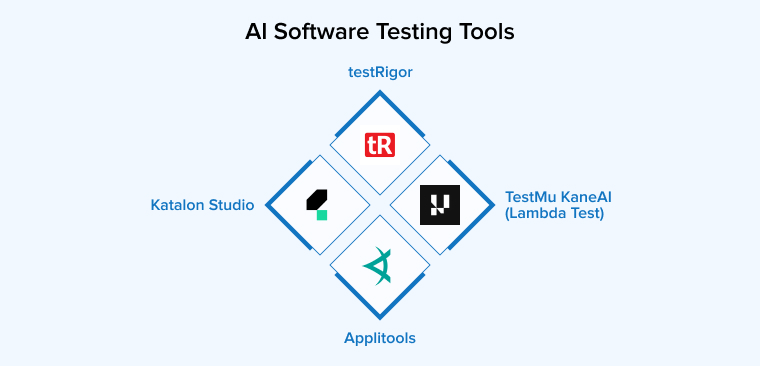
Katalon Studio
Katalon Studio provides a single platform for automating tests across web, mobile, API, and desktop apps. It uses AI to help teams create tests faster and maintain them with less effort. The tool can generate test cases from plain language and automatically repair broken elements.
Teams can connect it to CI/CD pipelines and run tests in the cloud or on local machines. Beginners can start quickly, while experienced users can explore advanced features, although some options require an enterprise plan.
testRigor
testRigor offers a no-code automation platform powered by generative AI. It allows teams to write tests in plain English instead of using programming languages. The system understands these instructions and runs them like a real user. It supports web, mobile, desktop, API, database, and visual testing in one place.
The tool adjusts automatically when the interface changes, which reduces test failures and maintenance work. TestRigor can integrate with CI/CD tools such as Jenkins and CircleCI, version control systems, bug tracking tools like JIRA, and communication systems such as Slack. Many teams use it to save time and focus on higher-value testing tasks.
TestMu KaneAI (Lambda Test)
TestMu KaneAI works as an AI-driven assistant for fast-moving QA teams. It helps users design, update, and manage test cases using simple natural language. Teams can describe what they want to test, and the system builds detailed steps automatically. It can also plan and run tests based on broader goals.
The platform converts tests into different programming languages, giving teams freedom to choose their framework. Users can edit tests in plain text or code, and both stay synchronized. It also connects with tools like Slack, Jira, and GitHub to support smooth collaboration.
Applitools
Applitools delivers AI-driven visual testing to help teams protect the look and feel of their applications. It compares screenshots with approved baselines and highlights layout shifts, missing elements, or style problems. The system works across browsers, devices, and screen sizes, giving broad coverage from a single test run.
Its Visual AI engine checks interfaces more intelligently than strict pixel matching. The platform also supports large-scale cross-browser validation and smart filtering for dynamic areas. Teams use it to manage visual checks, approvals, and UI changes with greater speed and confidence.
What Are the Use Cases of AI in Software Testing?
Some of the popular applications of AI in software testing are as follows:
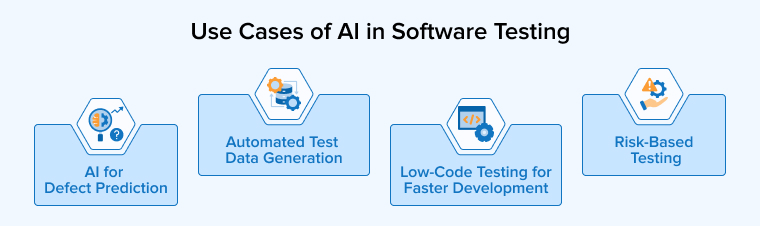
Automated Test Data Generation
Complex systems, such as global e-commerce platforms, require large and diverse datasets to test every possible scenario. Creating this data by hand takes a lot of time and effort. Teams also avoid using real customer data to protect privacy. AI can quickly generate realistic addresses and shipping combinations across different regions. It can consider factors such as weight, distance, carrier options, discounts, and extra fees. This approach saves hours of manual setup and helps teams test more cases with better coverage.
Low-Code Testing for Faster Development Cycles
AI is driving the growth of low-code testing tools that make automation accessible to more people. With Sauce Labs and its Low-code testing product, users can record actions on a real mobile device instead of writing scripts. The system observes each step and builds a reusable automated test. Teams can then run that test across many devices with little effort. The AI-powered dashboard also supports visual checks by detecting interface elements automatically. Testers spend less time handling technical details and more time improving scenarios and business-focused validation.
AI for Defect Prediction
AI helps teams identify software issues before they impact users. It analyzes historical test results, code changes, and test reports to learn where errors usually appear. Using this knowledge, it predicts which parts of the code may break in the next release. Testers can then focus on the most risky areas first, saving time and improving product quality. The system also spots patterns in developer activity and code complexity. It highlights weak modules and explains possible causes in clear language. As a result, teams fix issues faster and reduce the chance of serious failures in production.
Risk-Based Testing
In risk-based testing, the focus is on the most critical parts of the application that could lead to severe consequences in the event of failure. AI tools help in the identification of features that poses higher risk and need attention. Therefore, it promotes testing wisely and not testing everything equally. It is especially useful in projects with tight deadlines, limited resources, or complex systems. By prioritizing important areas, teams can improve software quality, reduce major failures, and deliver updates faster and more confidently.
What Are the Challenges of AI in Software Testing?
To utilize the maximum potential of artificial intelligence in software testing, it’s important to consider its following limitations:
Integration with Existing Tools and Processes
Many companies struggle to add AI testing tools to their current systems. Older platforms often lack modern APIs and clear documentation. Teams must adjust pipelines, workflows, and test frameworks to make everything compatible. This process takes time, planning, and sometimes major system changes.
Lack of Skilled Resources
AI testing demands skills that many traditional QA teams do not have. Testers must understand machine learning, data handling, and model results. Companies often train current teams or hire AI experts to fill this gap. Some also partner with nearshore teams to access skilled professionals at a lower cost. Without proper knowledge, teams may struggle to set up tools, adjust models, and read predictions correctly.
Maintenance of AI Models
AI models lose accuracy as systems change and new data appear. Shifts in user behavior and features can make old predictions unreliable. Teams must track model performance and update it regularly. Continuous retraining keeps results relevant and useful. Many companies build automated pipelines to refresh models with new data. This process helps maintain accuracy and supports changing business goals without manual effort.
Adapting to Evolving Applications
Some AI testing tools fail to keep pace with fast product updates. New features often introduce new user flows and system behaviors. Agile teams release changes frequently, which increases this challenge. If AI tools cannot adjust quickly, teams must retrain models again and again, which slows down delivery. Strong AI solutions learn from changes and adapt with minimal manual effort. Flexible tools support rapid development without constant rework.
Training Data Quality
AI-powered testing systems need large and varied data to learn properly. In the beginning, their suggestions may not fully match the company’s needs. Poor or incomplete test data can cause wrong predictions or missed defects. Biased or noisy datasets also reduce reliability. Therefore, teams must manage, label, and validate test data carefully. As models receive cleaner and broader data over time, they understand patterns better and deliver more accurate and useful insights.
Compliance Issues
Strict regulations create extra challenges for AI testing in sectors like healthcare, finance, and aviation. Authorities demand clear records and reasons behind every testing decision. Many AI tools do not naturally provide this level of transparency. Teams must adjust and train these systems to meet compliance rules. They need to configure models carefully and maintain detailed audit trails. Without proper setup, organizations risk failing regulatory requirements and facing penalties.
Future Trends of AI in Software Testing
Let’s discuss some of the future advancements AI will bring to the software testing industry:
Agentic Generation of Test Cases
In the coming years, AI systems will act as independent testing agents. They will build full test suites without human support. These agents will spot missing scenarios and create new test cases on their own. They will study application behavior and past defects to improve coverage over time. AI will also review requirements and code to design smarter tests. As applications change, these systems will adjust test strategies and maintain suites automatically.
ChatGPT in Test Automation
ChatGPT changes how teams approach test automation. Testers can explain scenarios in simple language instead of writing scripts. The system converts those instructions into working test cases and runs them across selected browsers. This approach makes automation easier for people without coding skills. It also reviews test results, highlights common failures, and explains issues clearly. Teams can even use it to create sample data and improve overall testing efficiency.
Hyper-Personalized Testing with Context Awareness
Future AI testing will focus on understanding real users. Instead of generic tests, it will create scenarios based on user types, devices, and cultural contexts. Testers will use AI insights to check accessibility, fairness, and usability. This ensures the software works well for everyone. By combining AI analysis with human judgment, teams can deliver more inclusive and user-friendly applications across diverse environments.
Quantum Computing Impact
Quantum computing will transform AI-driven software testing. It can run large test suites in seconds and handle complex simulations that classical computers struggle to perform. AI models will train faster and generate smarter test cases, including rare edge cases. Pattern recognition and predictive analysis will improve, helping teams find defects early. Despite its potential, adopting quantum testing requires new frameworks, specialized skills, and solutions for hardware errors.
Instant Feedback
AI helps developers catch problems as they write code. It predicts bugs, spots technical debt, and highlights reliability risks in real time. Teams can fix issues early, refactor complex areas, and improve system stability. These tools work within Agile and CI/CD workflows, enabling developers to adjust quickly. By analyzing past data and code patterns, AI guides smarter decisions and reduces production risks.
Final Thoughts
AI is transforming software testing by making it faster, smarter, and more accurate. It helps teams predict defects, optimize test coverage, and focus on critical issues. By automating routine tasks, AI frees testers to innovate and make better decisions. It integrates with workflows, improves reliability, and reduces risks. Rather than replacing humans, it empowers QA professionals to become strategists and problem-solvers.
Organizations that adopt AI-driven testing gain a competitive edge, shorten release cycles, and deliver higher-quality software. Embracing AI is no longer optional; it is essential for teams aiming to stay efficient, proactive, and future-ready in software development.
FAQs
No, AI will not replace software testers. It will assist them by automating repetitive tasks, predicting defects, and providing insights, allowing testers to focus on strategy, analysis, and improving software quality.
AI improves software testing by finding defects faster, predicting risky areas, automating repetitive tasks, and optimizing test coverage. It helps teams work smarter, reduce errors, and deliver higher-quality software efficiently.
As a QA, use AI to generate test cases, analyze results, predict defects, and prioritize testing. Let it automate repetitive tasks so you can focus on strategy and improving software quality.

Badal Patel is a Project Manager at TatvaSoft, overseeing a large team of software developers and ensuring the highest quality standards throughout the development process. He has over ten years of experience delivering reliable solutions across various industries.



Comments
Leave a message...