

Quality testing shapes the success of any software product. Teams rely on clear methods to build reliable and user-friendly applications. Two popular approaches guide this process: Behavior Driven Development (BDD) and Test Driven Development (TDD). Both promote testing early and often, yet they differ in purpose and style.
TDD requires developers to write tests before code and focus on small units. BDD encourages teams to describe system behavior in simple language and align features with user needs. These methods influence how teams plan, write, and validate software. Companies that offer software testing services often apply one or both approaches to improve quality and reduce risk.
In this blog, we will explore how BDD and TDD work, where they differ, and how they can support modern development practices.
What is Behavior Driven Development (BDD)?
Behavior Driven Development helps development teams build software by focusing on how the system should behave in real situations. Teams describe features in plain language so everyone can understand them. They write simple scenarios that explain what happens before an action, what action takes place, and what result should follow. This approach keeps developers, testers, and business members on the same page. It encourages discussion before coding begins, which reduces confusion later.
Developers first define the expected behavior, then write code to achieve it. These clear behavior descriptions act as both requirements and tests. As a result, teams create software according to user needs and business goals.
What Are the Benefits of Behavior-Driven Development (BDD)?
BDD increases the quality of the software testing process in multiple ways. Some of the significant ones are:
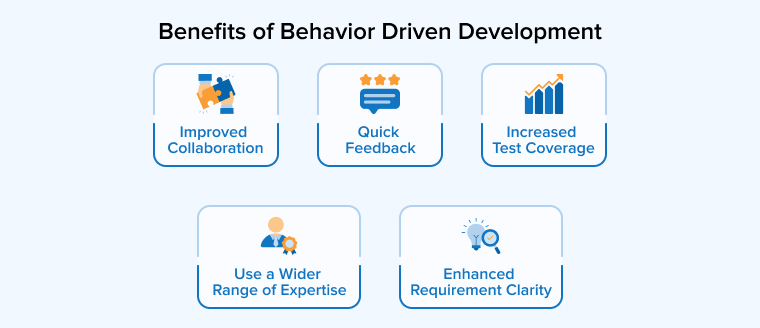
Improved Collaboration
Behavior Driven Development brings technical and business teams together through clear and simple communication. It helps developers, testers, and business members discuss features in plain language. Everyone understands what the system should do and why it matters. This shared understanding reduces confusion and avoids mistakes. Stakeholders can follow progress easily, even without technical knowledge. As a result, teams build software that supports real business needs and expectations.
Enhanced Requirement Clarity
BDD uses simple and clear language to describe how a system should work. Business members can explain their needs without using technical terms. Developers and testers understand these expectations easily. This approach keeps everyone aligned and reduces confusion. Teams work with shared clarity and deliver features that match business goals.
Leverage a Broader Range of Domain Expertise
When teams describe system actions in clear, simple terms, more people can participate in the discussion. Testers, architects, and business members share their ideas with confidence. Each role adds a unique viewpoint. This open involvement improves planning, reduces gaps, and leads to stronger and more reliable software solutions.
Quick Feedback
Behavior-driven development tests software in small, steady steps instead of one large cycle. Teams review results often and talk through changes together. Quick automated checks show problems early. Developers fix issues sooner, save time, and improve the product continuously before release.
Increased Test Coverage
Behavior-driven development relies on automated tests built from clear scenario descriptions. These tests check how the system acts in different situations. Teams cover many possible cases and user paths. This approach reduces the risk of hidden defects and helps keep the software reliable.
What Are the Disadvantages of Behavior Driven Development (BDD)?
Business and technical teams must consider the following challenges before implementing BDD:
Gap in Language Adoption
Our project team does not write user stories and acceptance criteria in Gherkin format. Business analysts describe requirements in plain text instead. This creates confusion between business and technical members. As a result, we struggle to show that BDD truly improves shared understanding and teamwork.
Creates Living Documentation
BDD creates executable documentation and helps new members learn the system faster. However, teams must update scenarios often, or they lose trust. They spend extra time writing and maintaining tests. The approach needs strong collaboration, specific testing tools, and does not cover every testing need.
Extended Deployment Time
Teams spend more time discussing and writing BDD scenarios together. This extra coordination can delay releases and push planned delivery dates further ahead.
Management and Verbosity
Teams often struggle to organize features and keep step definitions clear and consistent. Long scenarios increase repetition, making the automation framework harder to manage and keep structured.
How to Implement Behavior-Driven Development?
Behavior-Driven Development follows a structured three-phase implementation process:
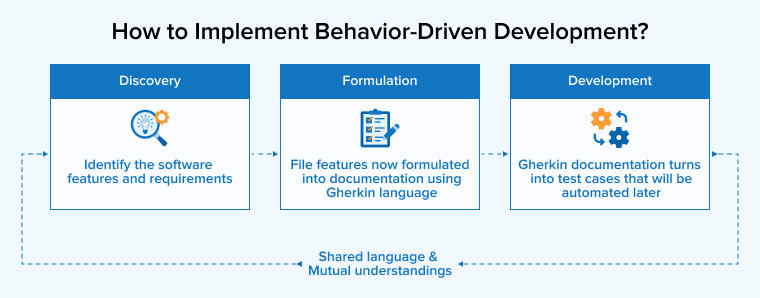
1. Discovery
At this stage, the team works closely to shape ideas into clear user stories. The product owner explains the main goals and larger features, then the team divides them into smaller tasks. Everyone discusses the purpose of each feature and the value it brings to users. They ask who will use it, what issue it solves, and how it should behave. Together, they define acceptance criteria and possible edge cases. These discussions build shared understanding and set clear expectations before development begins.
2. Formulation
After defining the story, the team turns general acceptance points into clear, practical examples using Gherkin. They write short, structured scenarios that anyone can read and understand. Each example describes the starting situation, the user’s action, and the expected result as per the “Given-When-Then” format. Instead of saying, “The user can log in,” they describe the full flow step by step. They show where the user begins, what details they enter, and what the system should display next.
Scenario:
- Valid user login redirects to the dashboard
- Given that the login screen is displayed
- When the user logs in using the correct credentials
- Then the authentication should succeed
- And the dashboard should be displayed to the user
These concrete BDD scenarios remove confusion and create a shared view of how the feature must behave from beginning to end.
3. Development
Developers convert the written scenarios into automated tests using a BDD framework. At first, these tests fail because the feature does not exist yet. The team then writes the required code to satisfy the scenarios and meet the acceptance criteria. As they complete the implementation, the tests begin to pass.
They run the tests within the same sprint to confirm correct behavior and catch problems early. The team improves and cleans the code while keeping all tests green. They repeat this cycle for new features and updates, using feedback to guide further changes.
Popular BDD Frameworks
Test cases in BDD can be automated using the following behavior-driven development (BDD) tools/frameworks:
Behat
Behat is an open-source BDD framework built for PHP projects. It allows teams to describe system behavior in plain language using Gherkin. Developers connect these steps to PHP code and reuse them across scenarios. The tool supports unit, integration, end-to-end, and acceptance testing.
Teams can run scenarios from the command line and filter specific tests when needed. With extensions such as Mink, it also handles browser-based testing. Feature files act as readable project documentation. Behat suits PHP well, but it does not support other languages and may slow down when many scenarios grow large.
Cucumber
Cucumber is a widely used open-source BDD tool that allows teams to write test scenarios in simple, natural language using Gherkin. It works with many programming languages, including Java, Ruby, JavaScript, and Python. Developers and non-technical stakeholders can read and understand the scenarios easily.
Cucumber integrates with popular testing frameworks such as JUnit and TestNG. It supports parallel test execution to speed up large projects. Feature files also act as living documentation, reflecting code changes over time. While it offers strong community support and many plugins, new users may face a learning curve, and managing a large test suite requires careful organization.
SpecFlow
SpecFlow is an open-source BDD tool built for the .NET platform. It lets teams describe features in Gherkin and link them to C# code inside Visual Studio. Developers reuse step definitions and connect tests with frameworks such as NUnit, MSTest, or xUnit. The tool supports data-driven tests, parallel runs, and CI/CD integration.
Plugins add syntax highlighting, auto-completion, and error checks for feature files. Reports combine documentation with test automation results, giving clear project visibility. SpecFlow works best for .NET teams, but setup can feel complex, and teams must invest time to learn Gherkin and maintain detailed scenarios.
When to Use BDD?
BDD is most suitable in the following scenarios:
- User-centric applications: BDD works best when teams care deeply about how users interact with the system. It keeps attention on real needs and expected outcomes. Teams use clear stories to guide development. This approach helps deliver features that match user expectations and provide real value.
- Refinement of acceptance criteria: BDD helps teams define clear acceptance rules before writing code. They describe expected behavior in simple language and turn it into automated tests. This method creates shared understanding, removes confusion, and checks that each feature meets business goals before release.
- Collaboration between stakeholders: BDD suits projects that need strong teamwork between business and technical members. It describes requirements in plain language that everyone can read and discuss. Product owners, analysts, and clients take part in shaping scenarios. This approach builds agreement early and reduces misunderstandings later.
- Clear documentation: Behavior-Driven Development helps teams describe software behavior in simple language that everyone understands. Stakeholders, testers, and developers discuss clear scenarios before coding begins. These examples guide development and stay updated as the project grows. This approach reduces confusion, improves quality, and supports fast feedback in agile projects.
What is Test Driven Development (TDD)?
Test-driven development is a method where developers create tests before writing the actual program code. They begin by writing a small test based on a specific requirement. When they run the test, it usually fails because the feature does not exist yet. The developer then writes just enough code to make the test pass. After that, they improve and clean the code without changing its behavior. This cycle repeats for every small feature.
TDD helps developers stay focused and think clearly about what the software should do. It also finds problems early and reduces repeated work. Many agile teams use this approach to build reliable and well-structured software step by step.
What Are the Benefits of Test-Driven Development (TDD)?
TDD offers the following advantages to the software testing teams in enhancing software quality:
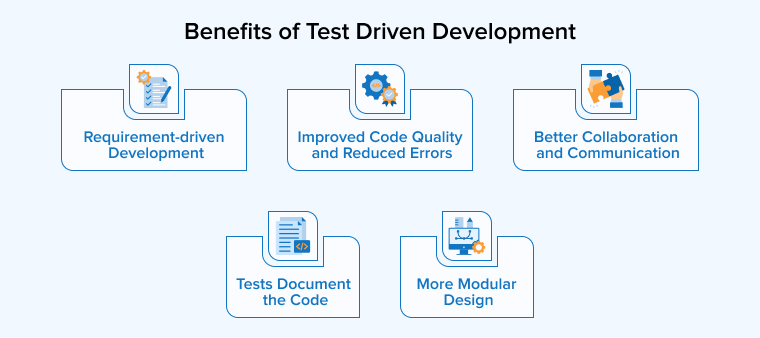
More Modular Design
TDD encourages developers to build software in small and independent parts. They focus on one tiny feature at a time and write a test before adding code. This habit naturally creates clear and simple modules. When a problem appears, they can quickly find the exact section that caused it. They fix the issue without disturbing the rest of the system.
Requirement-Driven Development
In TDD, developers stop writing code once all tests succeed. They only write new code when a new requirement appears, and a test demands it. This habit keeps the program simple and avoids extra features. Writing tests first also makes developers think carefully about behavior, user needs, and expected results before they begin coding.
Improved Code Quality and Reduced Errors
TDD improves software quality by performing tests at the starting point of development. Developers define the expected behavior first and then build code to satisfy those checks. This process helps them catch mistakes early and prevents hidden defects from growing. They work in small steps, which keeps the design clear and organized. Continuous testing gives quick feedback and supports careful coding habits. Over time, this approach builds reliable and maintainable software.
Better Collaboration and Communication
Test-driven development helps teams communicate clearly about what the software should do. Developers write tests that describe the expected behavior in simple terms. Testers and stakeholders can read these tests and confirm the goals. This shared reference reduces confusion and prevents wrong assumptions. Team members discuss results often and adjust plans when needed. Clients can also review the tests to ensure the system meets their needs.
Tests Document the Code
In test-driven development, tests act as practical examples of how the code works. They show how to call functions and what results to expect. Anyone can read them to understand the purpose of each part. New developers learn faster by studying these tests. Because tests explain small features clearly, they also make writing formal documentation much easier.
What Are the Disadvantages of Test Driven Development (TDD)?
TDD implementation may feel complicated due to the following limitations:
Slow Development
Test-driven development can slow progress at the beginning of a project. Developers must design tests, think about interfaces, and run checks before writing actual features. This process takes extra effort and careful planning. Teams working under strict deadlines may feel pressure because early tasks require more time. However, this early investment can reduce future debugging work and improve overall stability.
Frequent Test Updations
As the project grows, it becomes quite hectic to maintain tests as their number increases. Whenever there is any change in the requirements, developers must update the tests first and then modify the code accordingly, which demands time and effort. If not maintained properly, tests may become slow, outdated, or misleading, reducing their effectiveness.
Harder for UI-heavy or Visual Features
Test-driven development works well for systems that rely on clear logic and backend processing. It becomes harder to use when teams build rich interfaces, animations, or visual effects. Small unit tests cannot always capture what users actually experience on the screen. In such cases, teams often prefer broader testing approaches that focus on overall behavior.
Awareness and Learning Curve
Test-driven development succeeds only when developers create clear and dependable tests. Each test must stay simple, focused, and stable. Weak tests can confuse the team and produce false failures. This makes the process frustrating and time-consuming. Teams without strong testing skills often struggle to apply TDD correctly. Beginners must learn how to refactor code and design meaningful tests. They also need extra time to adjust to this disciplined approach.
Risk of Overemphasis on Unit Tests
Focusing only on unit tests can create problems later. Teams may test individual parts well but miss issues in the complete system. Integration and overall functionality can be overlooked. Developers should balance unit tests with broader checks. Considering the system as a whole ensures the software works correctly and avoids hidden problems that appear when components interact.
How to Implement Test-Driven Development?
Test-driven development works in a repeated cycle called Red-Green-Refactor. Developers start by writing a test and running it, expecting it to fail. Then they write just enough code to pass the test. Finally, they clean and improve the code. This cycle repeats for each test, gradually building the complete functionality step by step.
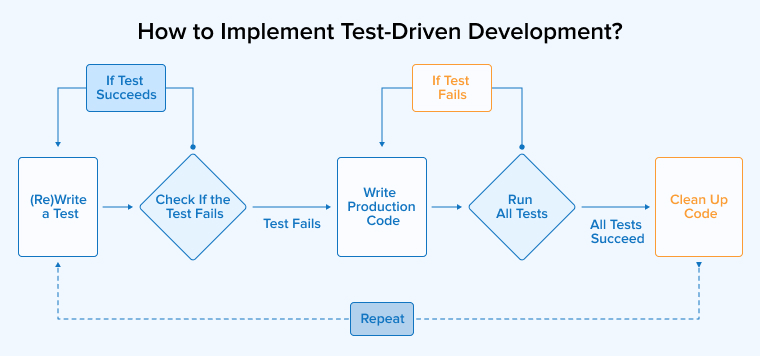
Let’s discuss the TDD development process in detail:
Red Phase
The red phase in test-driven development begins by writing a unit test for a small feature or behavior. This test is meant to fail initially because the functionality does not exist yet. A failing test confirms that the test is valid and meaningful. Developers clearly define the expected inputs, outputs, and conditions. Running the test highlights what needs to be implemented. This phase sets a checkpoint for development and guides the next step.
Tools like JUnit make writing and executing these tests easier. The red phase encourages working in small, controlled steps and ensures that developers focus on requirements before writing any production code. It forms the foundation for building reliable software.
Green Phase
The green phase in TDD begins after a test fails in the red phase. Developers write the simplest code possible to make the test pass. This code does not need to be perfect or fully optimized. The goal is to satisfy the test and nothing more, avoiding unnecessary features.
After writing the code, all tests are run to ensure nothing else breaks. This step promotes minimalism and keeps the focus on immediate requirements. By following test results, developers create clear, concise, and functional code. The green phase encourages building a lean codebase that is easy to maintain and refactor while giving quick feedback on correctness.
Refactor Phase
The refactoring phase in test-driven development comes after all tests pass in the green phase. Developers improve the code’s structure, remove duplication, and make it easier to read without changing its behavior. Tests act as a safety net, ensuring no existing functionality breaks. Refactoring can include renaming, simplifying logic, or organizing code for clarity. This step happens continuously after each small feature is added.
Once refactoring is done, the cycle repeats: a new test is written, the code is updated to pass it, and then the code is refined again. Over time, this keeps the codebase clean, maintainable, and reliable.
Popular TDD Frameworks
Test cases in TDD can be automated using the following test-driven development (TDD) tools/frameworks:
PyUnit
PyUnit, known as unittest, comes built into Python’s standard library. Developers can start writing tests without installing extra packages. It uses clear and familiar Python syntax, so creating and running tests feels simple and direct. The framework executes test cases quickly and can produce structured reports, including XML output.
Many Python projects rely on it, so it has strong community support. However, PyUnit offers only basic features compared to some external frameworks. Developers often add other libraries for advanced tasks like mocking or parameterized tests. It also requires repetitive setup code, which can make test files longer and sometimes harder to read.
NUnit
NUnit is a well-known testing tool for developers who build applications with .NET. It helps programmers create and run automated tests to check if their code works as expected. Developers can arrange tests in different ways, which makes it suitable for both small and large projects. It includes many assertion options, so users can verify results under many conditions.
NUnit also runs on different .NET platforms, including .NET Core, which gives teams flexibility. However, it primarily serves the .NET environment, so developers who use other languages cannot rely on it. Some beginners also feel that setting up and configuring NUnit takes time and careful attention.
Selenium
Selenium is a free toolset that helps developers control web browsers through code. It allows testers to perform actions such as clicking buttons, filling forms, and moving between pages. Teams use it to check how websites behave in browsers like Chrome, Firefox, and Safari. This makes cross-browser testing easier and more reliable. Selenium also supports headless mode, so tests can run without opening a visible browser window.
Developers can create detailed Extent Reports to review test results clearly. Many teams use Selenium in test-driven development to catch issues early and improve software quality.
When to Use TDD?
TDD is most suitable in the following scenarios:
- Focus on technical correctness: Teams use TDD when every function must work without error. It suits banking, finance, and core backend systems. Developers write tests first and ensure each feature behaves correctly.
- Early error detection: TDD allows developers to find mistakes at the start of development. It keeps the system steady over time. Teams test each unit to confirm that every small part works properly.
- Regulatory compliance and documentation: TDD supports compliance by linking tests directly to system requirements. Developers write tests before code and keep them updated. Each cycle records changes, and automated runs store dated results, which help teams prove regulatory adherence.
- Continuous integration environments: TDD works well in continuous integration setups where teams run tests many times a day. Developers check each update quickly. They prevent new changes from damaging existing features and keep improving the code steadily.
Difference Between Behavior Driven Development (BDD) and Test Driven Development (TDD)
Let us now compare TDD vs BDD across some considerable parameters to get a better clarity:
| Parameters | Behavior Driven Development (BDD) | Test Driven Development (TDD) |
|---|---|---|
| Testing Focus | BDD checks how software behaves for users and confirms expected actions. | Developers write tests first and then build features. They verify each small unit before completing the function. |
| Test Scope | Teams collaborate to test full system scenarios across combined components. | Here, developers test single units to ensure accurate and reliable code. |
| Language | BDD scenarios use clear English, so everyone can easily understand expected behavior. | TDD test cases use programming languages and follow technical code syntax. |
| Written By | Team members, including developers, testers, and product owners, create BDD scenarios. | TDD test cases are written mainly by developers during the coding process. |
| Stakeholders | BDD engages the whole team, including developers, testers, product owners, and business analysts. | Mainly developers TDD has only to do with developers |
| Tools/Frameworks | BDD scenarios can be automated using tools like Cucumber, JBehave, and SpecFlow. | TDD uses tools like JUnit, NUnit, and TestNG to run tests. |
| Test Organization | BDD scenarios are grouped by features to show expected system behavior clearly. | TDD tests are arranged by code modules following a structured and hierarchical order. |
| Bug Tracking | BDD bug tracking is complex and needs multiple tools integrated across the organization. | TDD makes bug tracking simple because tests show right away if the code passes or fails. Developers quickly find and fix errors. |
| Iterative refinement and feedback | BDD improves scenarios step by step using team feedback and collaboration. | TDD improves code gradually by fixing failures and updating tests repeatedly. |
Final Thoughts
TDD and BDD are two approaches that improve software quality in different ways. TDD helps developers write correct code by testing small units, while BDD focuses on overall system behavior and encourages collaboration among the whole team. Both approaches can work together, with TDD handling unit tests and BDD guiding high-level behavior. Choosing the right method depends on project needs, team structure, and desired outcomes.
FAQs
No, BDD and TDD are different. TDD tests code units, while BDD focuses on user behavior and team collaboration.
Yes, teams can use TDD and BDD together. TDD ensures code works correctly, while BDD validates overall system behavior and user requirements.
The golden rule of TDD is to write tests before writing code and ensure all tests pass before adding new functionality.
The three phases of BDD are discovery, formulation, and development.

Badal Patel is a Project Manager at TatvaSoft, overseeing a large team of software developers and ensuring the highest quality standards throughout the development process. He has over ten years of experience delivering reliable solutions across various industries.



Comments
Leave a message...